> ## Documentation Index
> Fetch the complete documentation index at: https://densify-sync-changelog-51.mintlify.site/llms.txt
> Use this file to discover all available pages before exploring further.

# Kubex Features

This topic summarizes both new and updated features introduced in Kubex

<Accordion title="4.5.0 May 27, 2026">
  The following changes have been made to Kubex in this release:

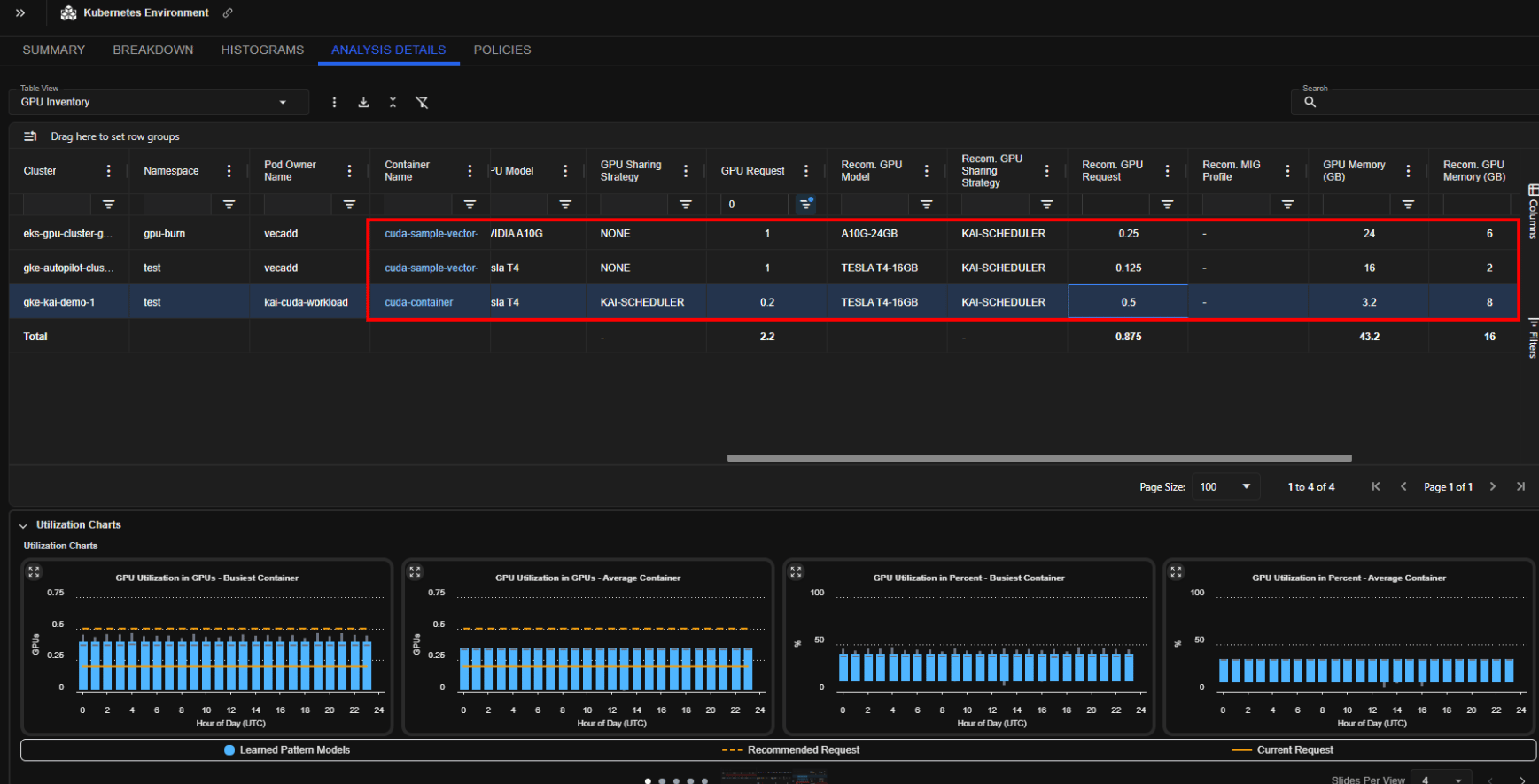
  * **Fractional GPU Recommendations**

    * Fractional GPU recommendations on the current GPU model

      <Frame caption="Figure: Fractional GPU recommendations">
        <img src="https://mintcdn.com/densify-sync-changelog-51/JrVB8Rbd7b6u7XzQ/images/docs/ReleaseNotes/v4.5/fractional_gpu_recos.png?fit=max&auto=format&n=JrVB8Rbd7b6u7XzQ&q=85&s=eb964db6d79a8aec89f2d24180557594" width="100%" data-path="images/docs/ReleaseNotes/v4.5/fractional_gpu_recos.png" />
      </Frame>

  * **GKE Autopilot Recommendations are Compute Class Aware**
    * Recognizes "balanced" and "general-purpose" compute classes and maintains the allowed CPU:Memory ranges

  * **Guaranteed QoS Support**
    * Kubex recommendations support Guaranteed QoS
    * This policy can be enforced (even if not currently setup) or auto-detected and maintained

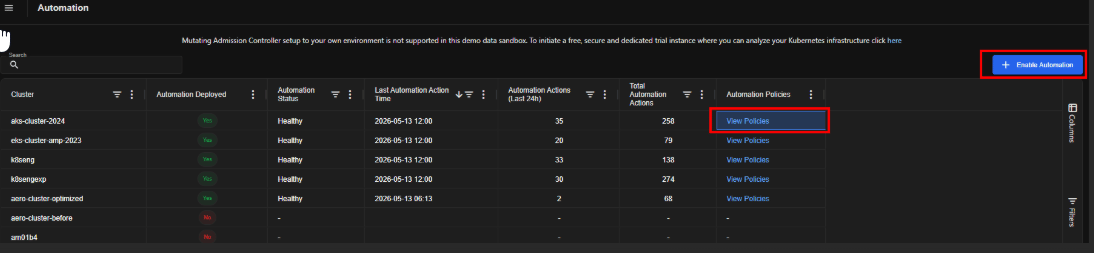
  * **Container Automation Policy**

    * Visibility to the automation policy set up in the K8s cluster
      <Frame caption="Figure: Automation Policy">
        <img src="https://mintcdn.com/densify-sync-changelog-51/JrVB8Rbd7b6u7XzQ/images/docs/ReleaseNotes/v4.5/automation_policy.png?fit=max&auto=format&n=JrVB8Rbd7b6u7XzQ&q=85&s=82d8e43ce04f2b47b20fde4def1b931a" width="100%" data-path="images/docs/ReleaseNotes/v4.5/automation_policy.png" />
      </Frame>

  * **RBAC for AI Agent**
</Accordion>

<Accordion title="4.4.0 April 29, 2026">
  The following changes have been made to Kubex in this release:

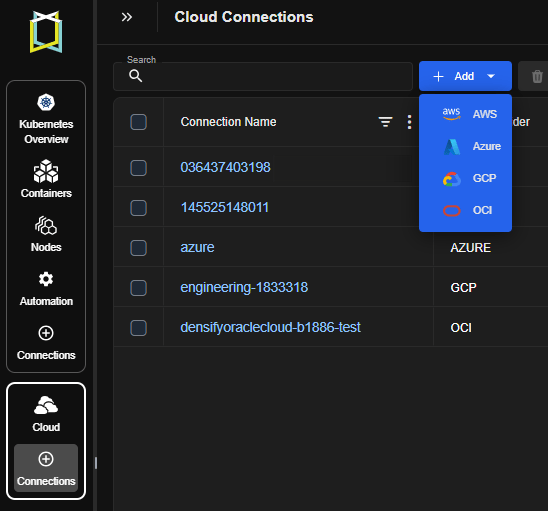
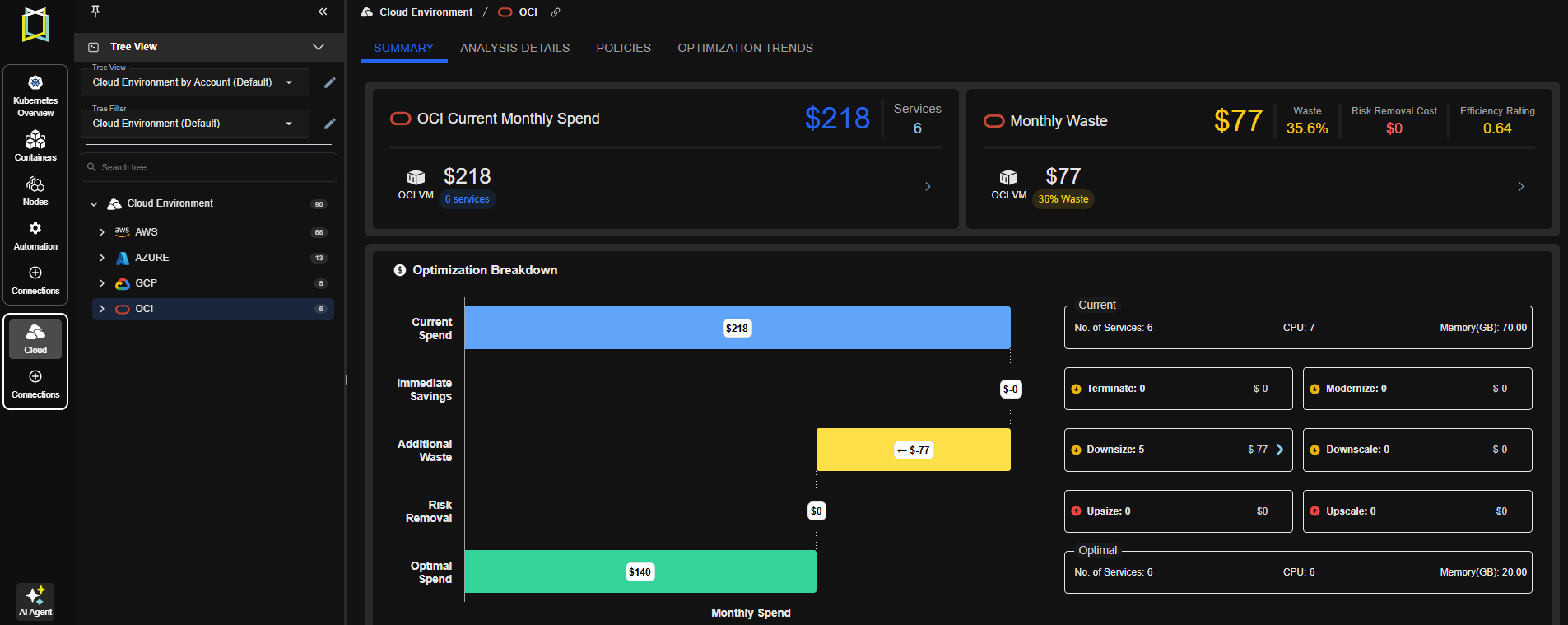
  * **Oracle Cloud Infrastructure (OCI) Support**

    * Added support for OCI connections from the Cloud Connections page
    * Enabled data collection and optimization for OCI Virtual Machines (VMs)
    * Added support for App Owner report

      <Frame caption="Figure: Add OCI Connection">
        <img src="https://mintcdn.com/densify-sync-changelog-51/ePpVSDQhElBUQJRk/images/docs-cloudex/cloud_oci_connection.png?fit=max&auto=format&n=ePpVSDQhElBUQJRk&q=85&s=4355e9e991e0d1b195ad29862ce056e4" width="100%" data-path="images/docs-cloudex/cloud_oci_connection.png" />
      </Frame>

      <Frame caption="Figure: OCI Optimization">
        <img src="https://mintcdn.com/densify-sync-changelog-51/ePpVSDQhElBUQJRk/images/docs-cloudex/cloud_oci_summary.png?fit=max&auto=format&n=ePpVSDQhElBUQJRk&q=85&s=1cd6b1f09bf0bea65a98a3782b7104c9" width="100%" data-path="images/docs-cloudex/cloud_oci_summary.png" />
      </Frame>

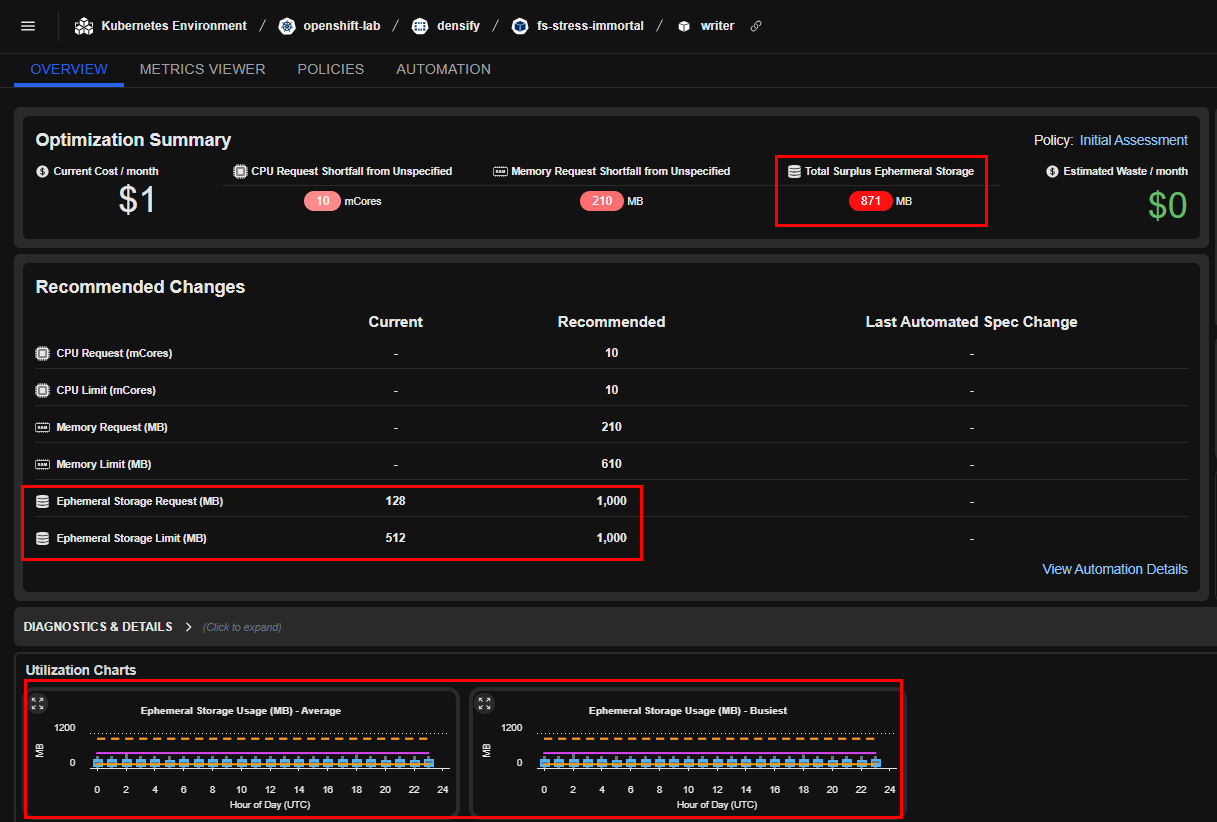
  * **Container Ephemeral Storage Optimization**

    * Introduced ephemeral storage recommendations in the UI and REST API
    * Added support for ephemeral storage policies
    * Note: Ephemeral storage data collection is opt-in and disabled by default
      <Frame caption="Figure: Ephemeral Storage Optimization">
        <img src="https://mintcdn.com/densify-sync-changelog-51/Gu3P6aEZHp3w-Ux-/images/docs-kubex/k8s_overview_ephemeralStorage.png?fit=max&auto=format&n=Gu3P6aEZHp3w-Ux-&q=85&s=ac210fd19f03a8cccb3057be0edbcbc1" width="100%" data-path="images/docs-kubex/k8s_overview_ephemeralStorage.png" />
      </Frame>

  * **Widget Enhancements**
    * Added GPU Trend widget to visualize GPU usage over time
    * Added Prioritizer Insights widget to summarize recommended actions to focus on based on environment and preferences

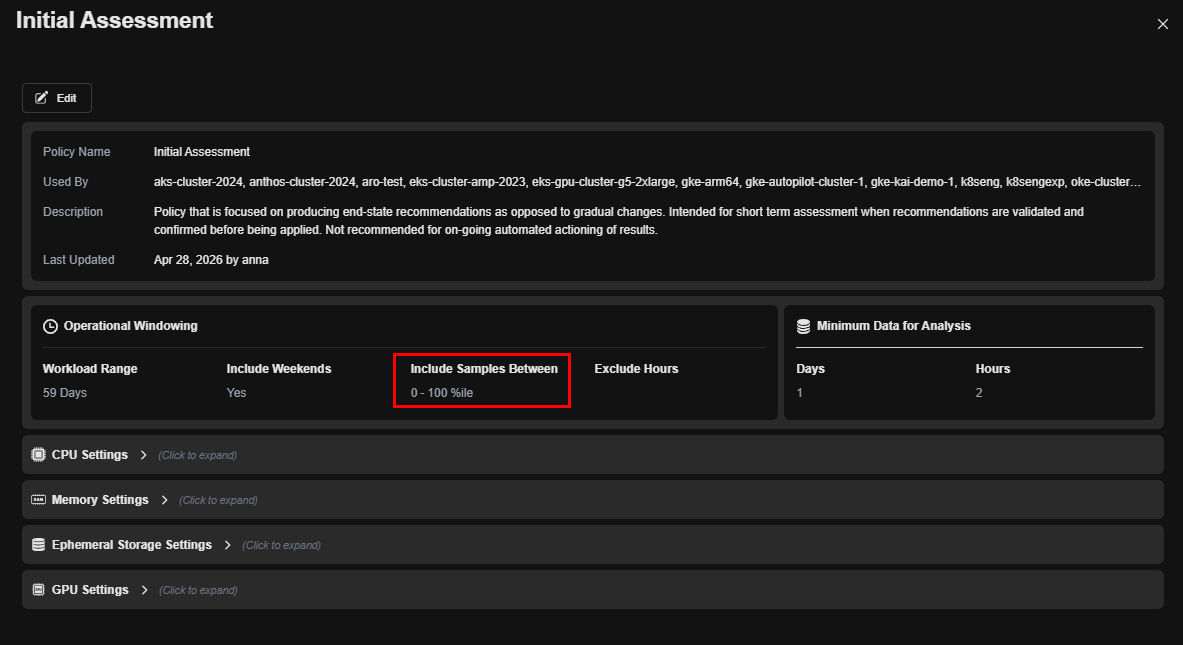
  * **Policy Enhancements**

    * Improved Policy Viewer layout for readability and navigation
    * Added support for configuring samples percentile in Container and Cloud policies
      <Frame caption="Figure: Container Policy">
        <img src="https://mintcdn.com/densify-sync-changelog-51/Gu3P6aEZHp3w-Ux-/images/docs-kubex/k8s_policy.png?fit=max&auto=format&n=Gu3P6aEZHp3w-Ux-&q=85&s=b2ea49778612f7efb1ff5d08843d0c00" width="100%" data-path="images/docs-kubex/k8s_policy.png" />
      </Frame>

  * **API Enhancements**
    * Added Automation Engine heartbeat endpoint:
      `POST /automation/clusters/{clusterName}/heartbeat`

  * **UI Improvements**
    * Added container cost visibility to the Container Overview page
    * Enabled Edit and Delete functionality on the Cloud Connections page

  * **Access Control & Security**
    * Added support for Okta Groups for permission management. Enabled assignment of user permissions based on group membership
    * Added support for Microsoft Graph scopes (for example, `User.Read`) in Azure OpenID integrations
</Accordion>

<Accordion title="4.2.0 March 11, 2026">
  The following changes have been made to Kubex in this release:

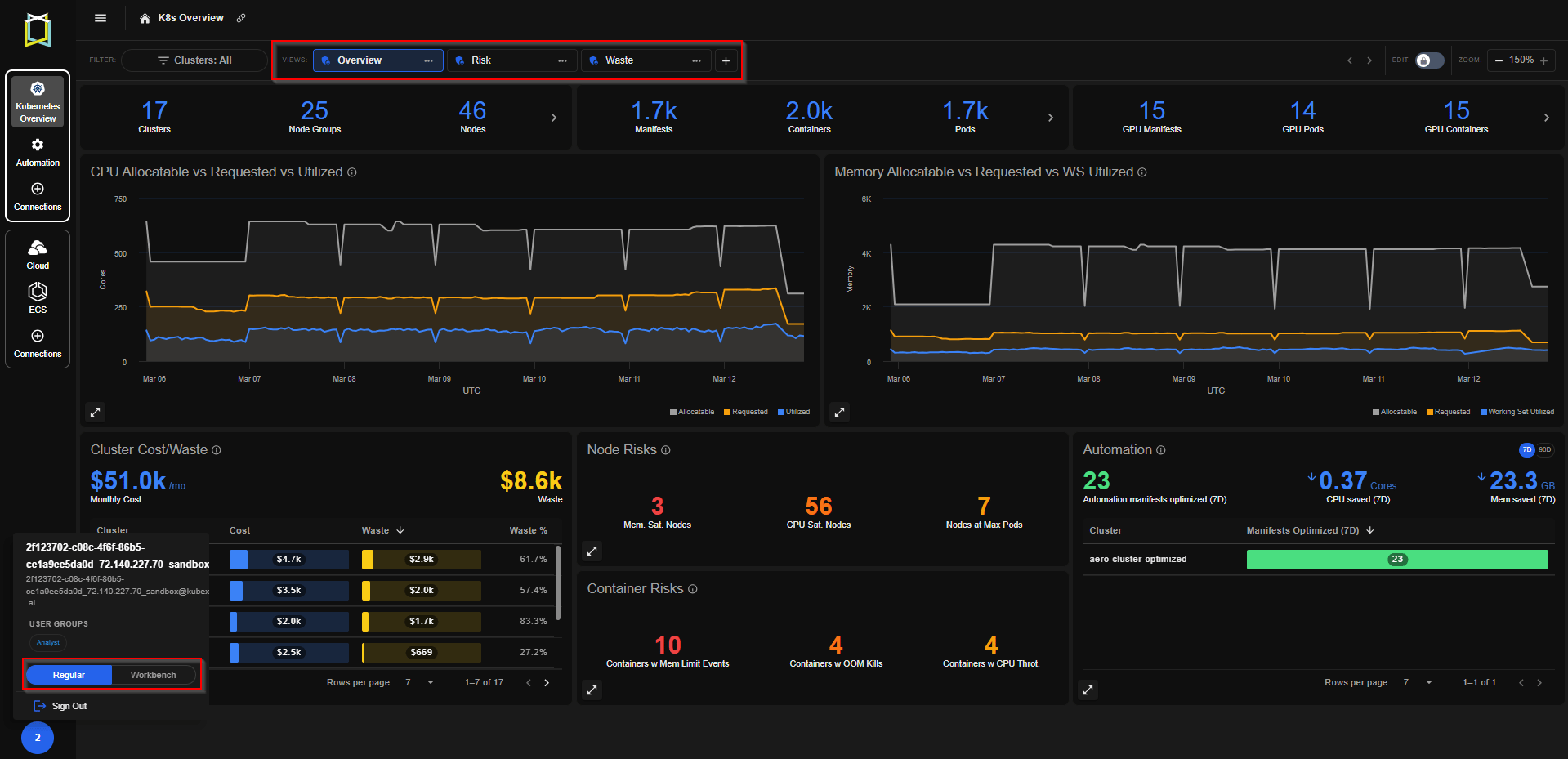
  * **Kubernetes Dashboard**

    * Kubex introduces a new customizable dashboard that serves as the default landing page, enabling users to compose their own workspace using widgets for faster operational insights.
    * The dashboard includes preconfigured views that organize key metrics and charts into ready-to-use layouts. Users can customize these views by arranging widgets and visualizations to match their operational workflow.
    * Users can choose whether the classic interface or the new dashboard is used as their default landing page.

      <Frame caption="Figure: Kubernetes Overview">
        <img src="https://mintcdn.com/densify-sync-changelog-51/Gu3P6aEZHp3w-Ux-/images/docs-kubex/k8s_kubernetes_dashboard.png?fit=max&auto=format&n=Gu3P6aEZHp3w-Ux-&q=85&s=5f3a9ce6f966801ab060a49ef8adc639" width="100%" data-path="images/docs-kubex/k8s_kubernetes_dashboard.png" />
      </Frame>

  * **Improved Node and Container Visibility**
    * Container Details now displays node names instead of only a count.
    * Horizontal Pod Autoscaler (HPA) settings are now visible in the Container Details table.
    * Node group and node metrics now include 5-minute metric samples.

  * **API Enhancements**
    * GPU recommendation details added to the Containers API endpoint `GET /kubernetes/clusters/<clusterName>/containers?details=true`
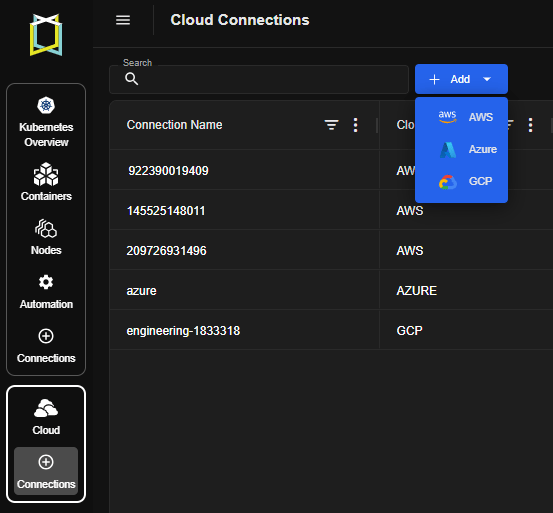
  * **Google Cloud (GCP) Connection Support**

    * Kubex now supports Google Cloud Platform (GCP) connections directly from the Kubex UI.

      <Frame caption="Figure: Add GCP Connection">
        <img src="https://mintcdn.com/densify-sync-changelog-51/ePpVSDQhElBUQJRk/images/docs-cloudex/cloud_gcp_connection.png?fit=max&auto=format&n=ePpVSDQhElBUQJRk&q=85&s=a4d01d68fddceb44c2f7a86b5bf607cb" width="100%" data-path="images/docs-cloudex/cloud_gcp_connection.png" />
      </Frame>

  * **AWS RDS Connection Data Support**
    * Kubex now collects and analyzes AWS RDS connection data, enabling deeper visibility into database activity and incorporating this data into platform analysis.

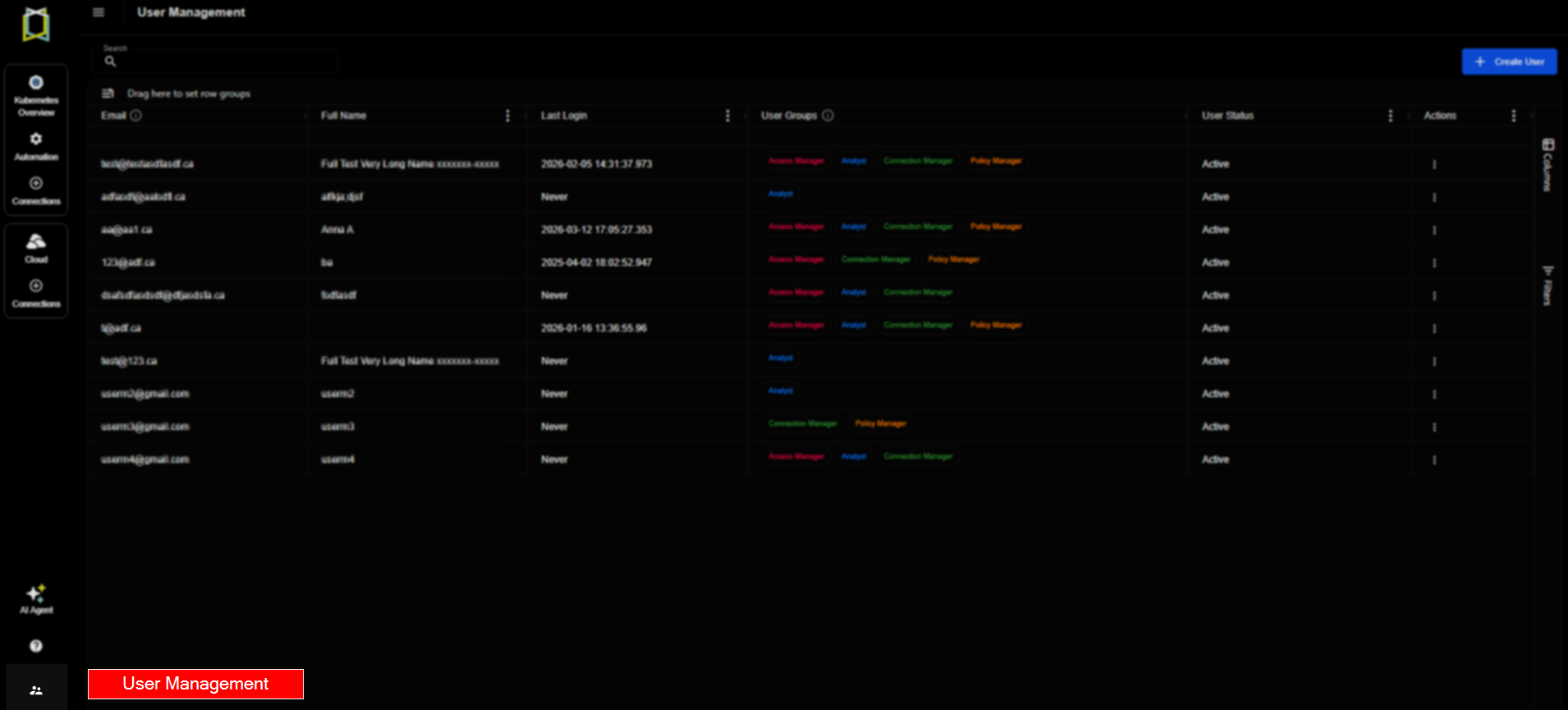
  * **User Management**

    * Users in the Access Manager group can now access User Management
    * Added sign-out functionality in the Kubex UI
      <Frame caption="Figure: User Management">
        <img src="https://mintcdn.com/densify-sync-changelog-51/JrVB8Rbd7b6u7XzQ/images/docs-kubex/kubex_user_management.png?fit=max&auto=format&n=JrVB8Rbd7b6u7XzQ&q=85&s=70666ff3bda111ac260b09462547f758" width="100%" data-path="images/docs-kubex/kubex_user_management.png" />
      </Frame>

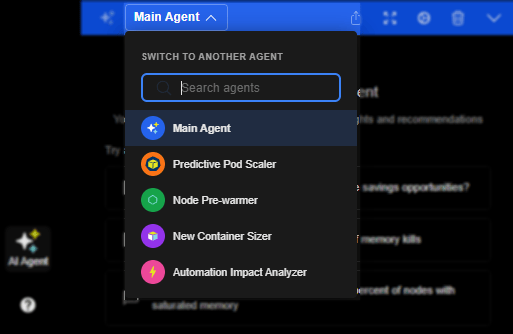
  * **Multi AI-Agent Support**

    * Kubex now supports multiple AI agents, enabling users to switch between specialized agents for tasks such as predictive pod scaling, node pre-warming, container sizing, and automation impact analysis.
      <Frame caption="Figure: Multi AI-Agent Support">
        <img src="https://mintcdn.com/densify-sync-changelog-51/Gu3P6aEZHp3w-Ux-/images/docs-kubex/kubex_multi_ai_agent.png?fit=max&auto=format&n=Gu3P6aEZHp3w-Ux-&q=85&s=56fcdba555f90fc1e5ed25b6c2bd5d25" width="100%" data-path="images/docs-kubex/kubex_multi_ai_agent.png" />
      </Frame>
</Accordion>

<Accordion title="4.1.0 January 21, 2026">
  The following changes have been made to Kubex in this release:

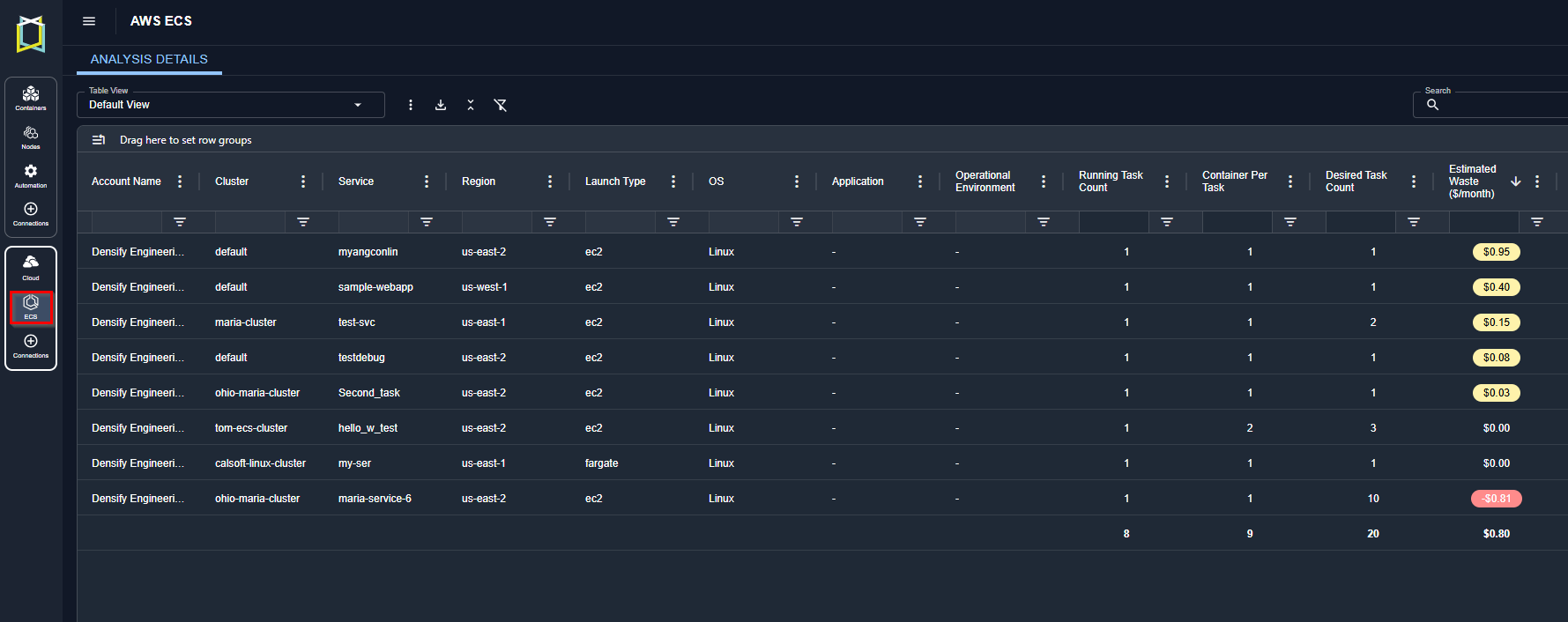
  * **AWS ECS Support**

    * Kubex now shows optimization recommendations for Amazon ECS workloads, helping you right-size your containerized applications running on ECS for optimal performance and cost efficiency.
    * The ECS button the left-hand menu only shows up if there is ECS data.

      <Frame caption="Figure: AWS ECS Recommendations">
        <img src="https://mintcdn.com/densify-sync-changelog-51/ePpVSDQhElBUQJRk/images/docs-cloudex/aws_ecs_details.png?fit=max&auto=format&n=ePpVSDQhElBUQJRk&q=85&s=d4d1f3e357cd60b058b7908e25ca3c02" width="100%" data-path="images/docs-cloudex/aws_ecs_details.png" />
      </Frame>

  * **PKCE Support for SSO using OpenID**
    * PKCE (Proof Key for Code Exchange) is a security extension that enhances OAuth 2.0 authorization flows.

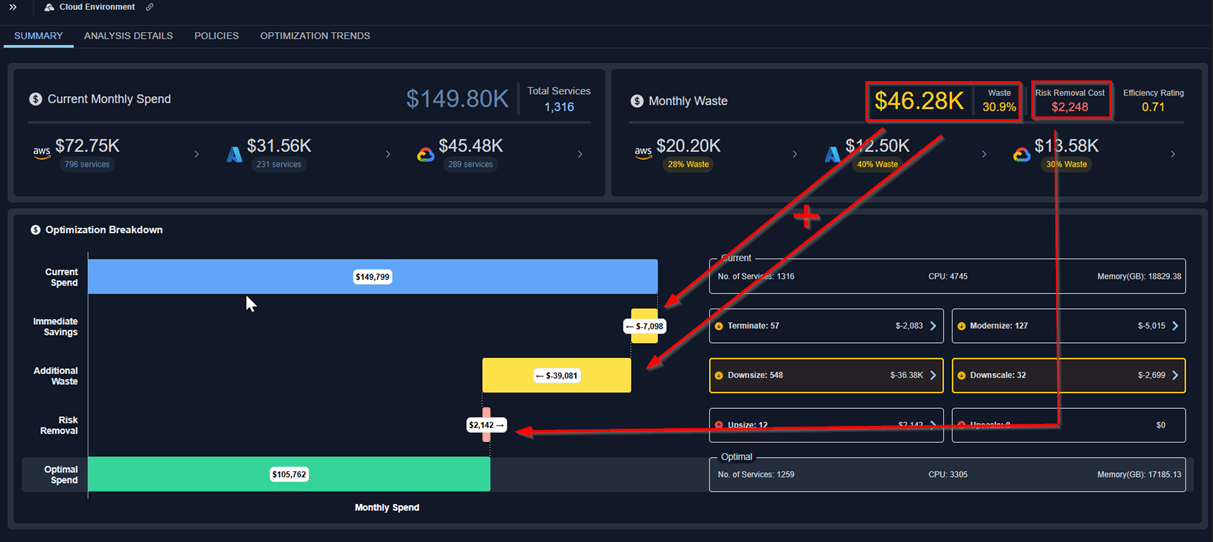
  * **Cloud Summary Separates Waste and Risk**

    * Netting out Waste and Risk hides the true savings potential.
    * By displaying 'waste' and 'cost of risk removal' as separate metrics, users can better understand each savings opportunity.
      <Frame caption="Figure: Cloud Waste and Risk">
        <img src="https://mintcdn.com/densify-sync-changelog-51/ePpVSDQhElBUQJRk/images/docs-cloudex/cloud_summary_risk_waste_separation.png?fit=max&auto=format&n=ePpVSDQhElBUQJRk&q=85&s=a4a30fdfd616f61a9463e836a2a83867" width="100%" data-path="images/docs-cloudex/cloud_summary_risk_waste_separation.png" />
      </Frame>

  * **Node Group Cost on the Details table**
    * Node Group costs are displayed in the details table.
    * Costs are calculated based on the sum of the costs of all nodes running in the node group. It takes into account the # of hours each node was running.

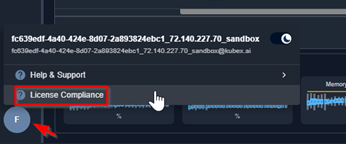
  * **License Compliance Report**

    * The license compliance report has been migrated to the Kubex UI.
    * The report shows how many Kubex licenses are being consumed against what is contractually allowed.
      <Frame caption="Figure: License Compliance">
        <img src="https://mintcdn.com/densify-sync-changelog-51/ePpVSDQhElBUQJRk/images/docs-cloudex/license_compliance.png?fit=max&auto=format&n=ePpVSDQhElBUQJRk&q=85&s=08959fa74ff8e44123d2eb65713e30ca" width="100%" data-path="images/docs-cloudex/license_compliance.png" />
      </Frame>
</Accordion>

<Accordion title="4.0.0 December 03, 2025">
  The following changes have been made to Kubex in this release:

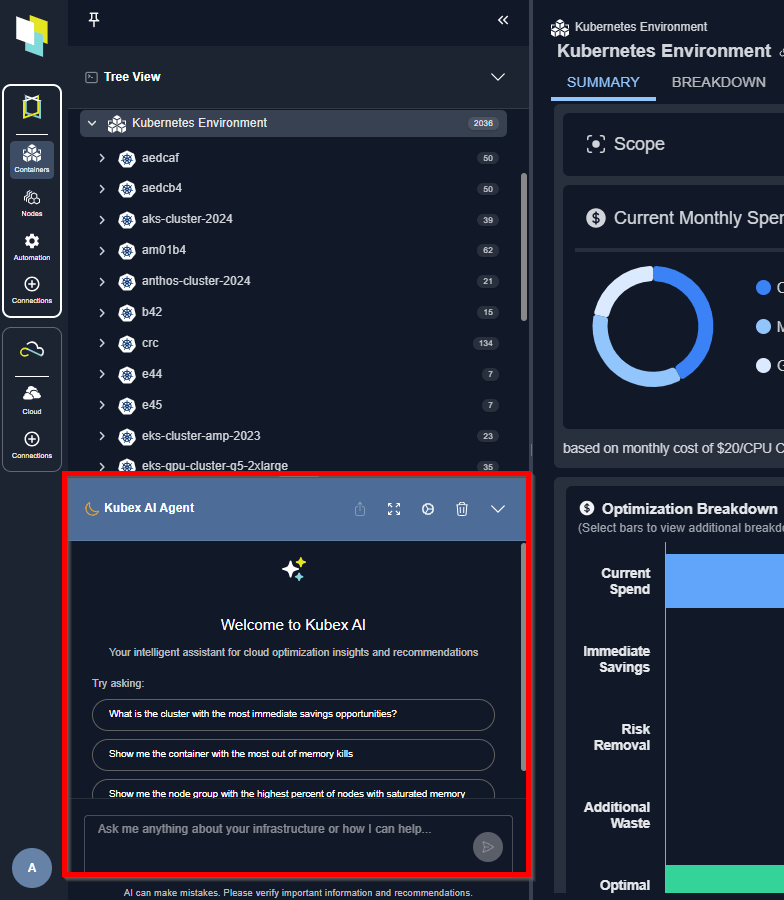
  * **New Kubex AI Agent Experience**

    * Natural-Language Interaction: Users can now simply ask questions in plain English and get accurate, contextual answers directly from the AI agent.
    * Guided Navigation: The agent can take users to the right features or pages in the product-no need to search menus or remember where things live.
    * Action Assistance: Beyond answering questions, the agent can help surface relevant insights, and streamline everyday tasks.
    * Enterprise-Grade Data Privacy: No customer data is used for model training. The underlying LLM does not learn from or use customer data to train or improve itself.

      <Frame caption="Figure: Kubex AI Agent">
        <img src="https://mintcdn.com/densify-sync-changelog-51/JrVB8Rbd7b6u7XzQ/images/docs/ReleaseNotes/v4.0/kubex_ai_agent.png?fit=max&auto=format&n=JrVB8Rbd7b6u7XzQ&q=85&s=bbf94364797080ffd0e26166ce1bad3e" width="100%" data-path="images/docs/ReleaseNotes/v4.0/kubex_ai_agent.png" />
      </Frame>

    **Enhanced GPU Analysis**

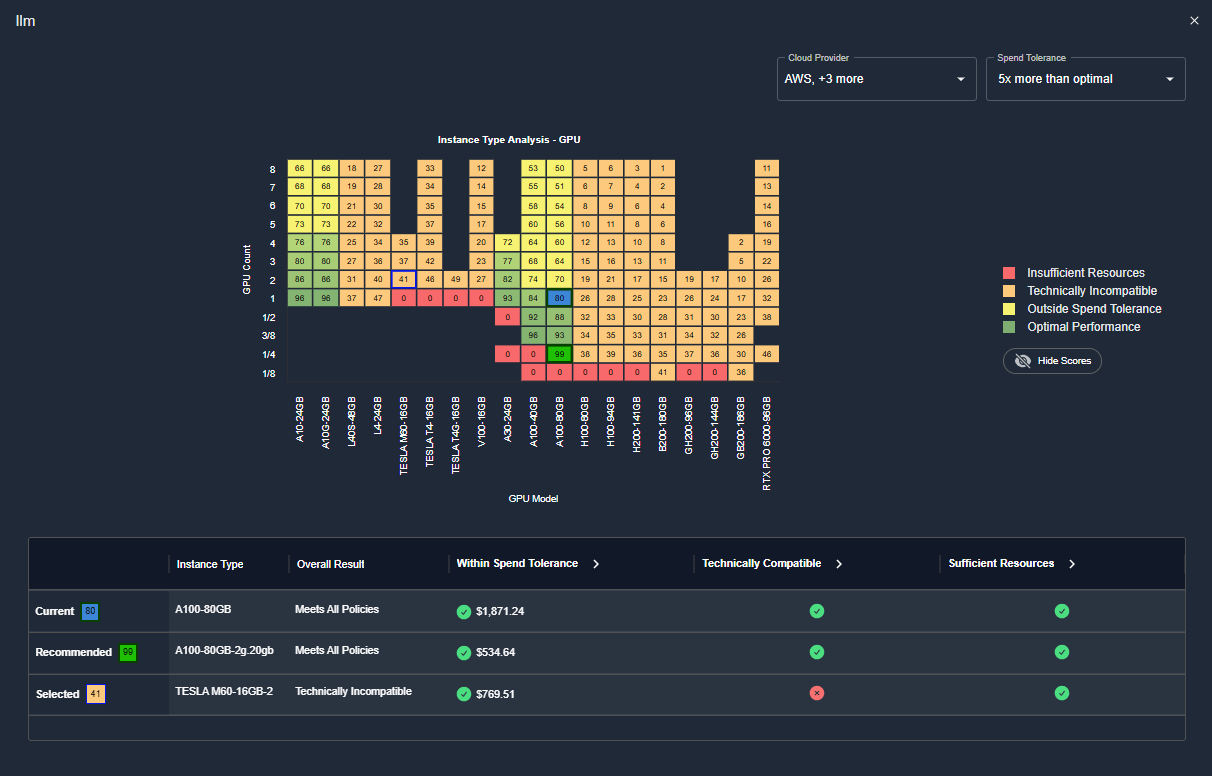
    * The Kubex GPU analysis recommends the optimal GPU model and configuration for maximum potential savings. This includes alternative GPU models, provided they are compatible with the workload.
    * The newly introduced *GPU Catalog Map* provides a visual comparison of how the current workload scores against all GPU models and configurations.
      <Frame caption="Figure: GPU Catalog Map">
        <img src="https://mintcdn.com/densify-sync-changelog-51/JrVB8Rbd7b6u7XzQ/images/docs/ReleaseNotes/v4.0/gpu_catalog_map.png?fit=max&auto=format&n=JrVB8Rbd7b6u7XzQ&q=85&s=39b10da49eac24a91d1f1a9de1ad1e56" width="100%" data-path="images/docs/ReleaseNotes/v4.0/gpu_catalog_map.png" />
      </Frame>
</Accordion>

<Accordion title="3.8.0 November 26, 2025">
  The following changes have been made to Kubex in this release:

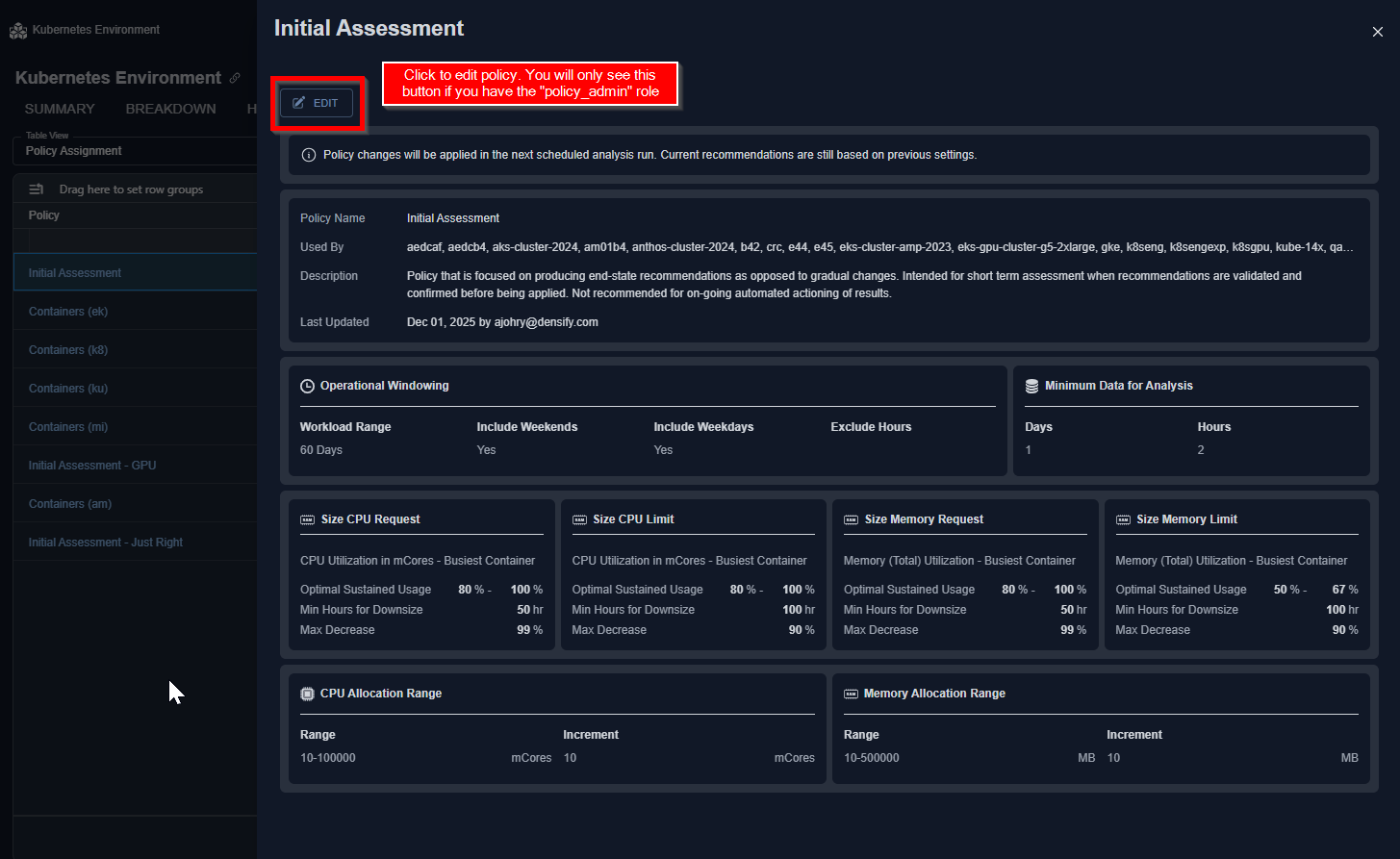
  * **Policy Editing**

    * Version 3.8 includes a new and often requested capability to edit analysis policies via the UI.
    * The "policy\_admin" role enables specific users with the ability to edit both cloud and container analysis policy settings directly from the Kubex UI.
    * Additionally, the last update date - and who made the update - are now exposed in the UI.
    * The policy descriptions have been updated to make them easier to understand, and tooltips now include detailed information about each setting along with their default value.

      <Frame caption="Figure: Policy Editing">
        <img src="https://mintcdn.com/densify-sync-changelog-51/JrVB8Rbd7b6u7XzQ/images/docs/ReleaseNotes/v3.8/policy_editable_dialog.png?fit=max&auto=format&n=JrVB8Rbd7b6u7XzQ&q=85&s=432f203940dc40f71da9e9a3f12ab8d6" width="100%" data-path="images/docs/ReleaseNotes/v3.8/policy_editable_dialog.png" />
      </Frame>

    **Cloud Optimization Trends Improvements**

    * The performance in loading and rendering the optimization trends charts located on the cloud Summary and Optimization Trends tabs has been significantly improved in this release.

    **Kubex Data Collection for GKE Autopilot Clusters**

    * Kubex now supports data collection and analysis of containers running in GKE Autopilot Clusters providing visibility to container level risk and waste along with remediation recommendations for optimizing container resource allocations.
</Accordion>

<Accordion title="3.7.0 November 6, 2025">
  <Accordion title="Updates to Container Optimization">
    The following changes have been made to Kubex in this release:

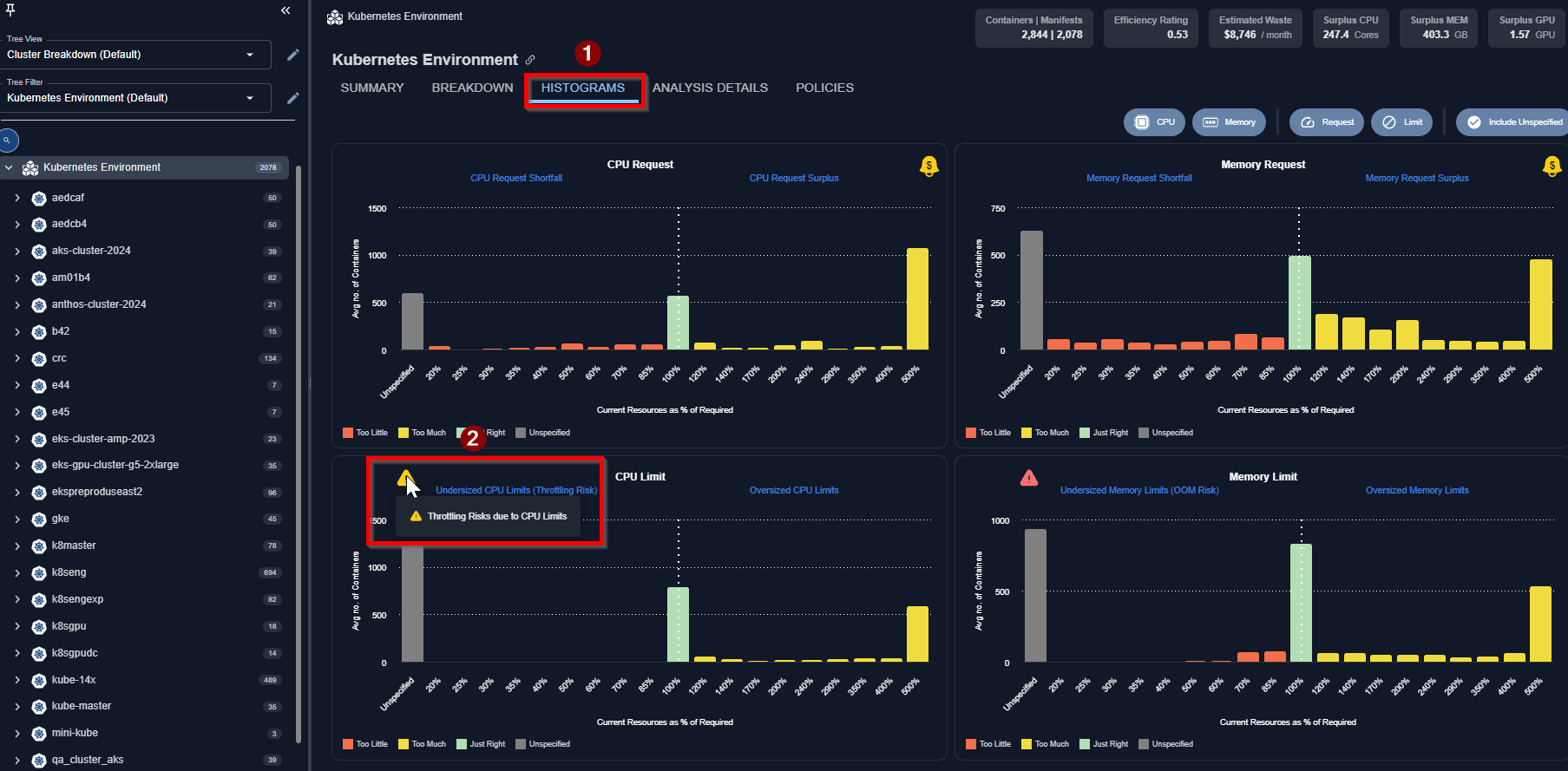
    * **CPU Throttling Risks**
      * The CPU Throttling risks due to undersized CPU Limits are highlighted in the Histogram.
      * Clicking on the risk item (as shown below) will take you to the Analysis Details page showing all the containers with CPU Throttling risks, and the Kubex recommendation to address it.
          <Frame caption="Figure: Analysis Details Table - Recommended MIG Device">
            <img src="https://mintcdn.com/densify-sync-changelog-51/JrVB8Rbd7b6u7XzQ/images/docs/ReleaseNotes/v3.7/cpu_throttling_risk_historgram.png?fit=max&auto=format&n=JrVB8Rbd7b6u7XzQ&q=85&s=94bb10f551d82f8aea3cd2ee84f9a500" width="100%" data-path="images/docs/ReleaseNotes/v3.7/cpu_throttling_risk_historgram.png" />
          </Frame>
  </Accordion>

  <Accordion title="Updates to Cloud Optimization">
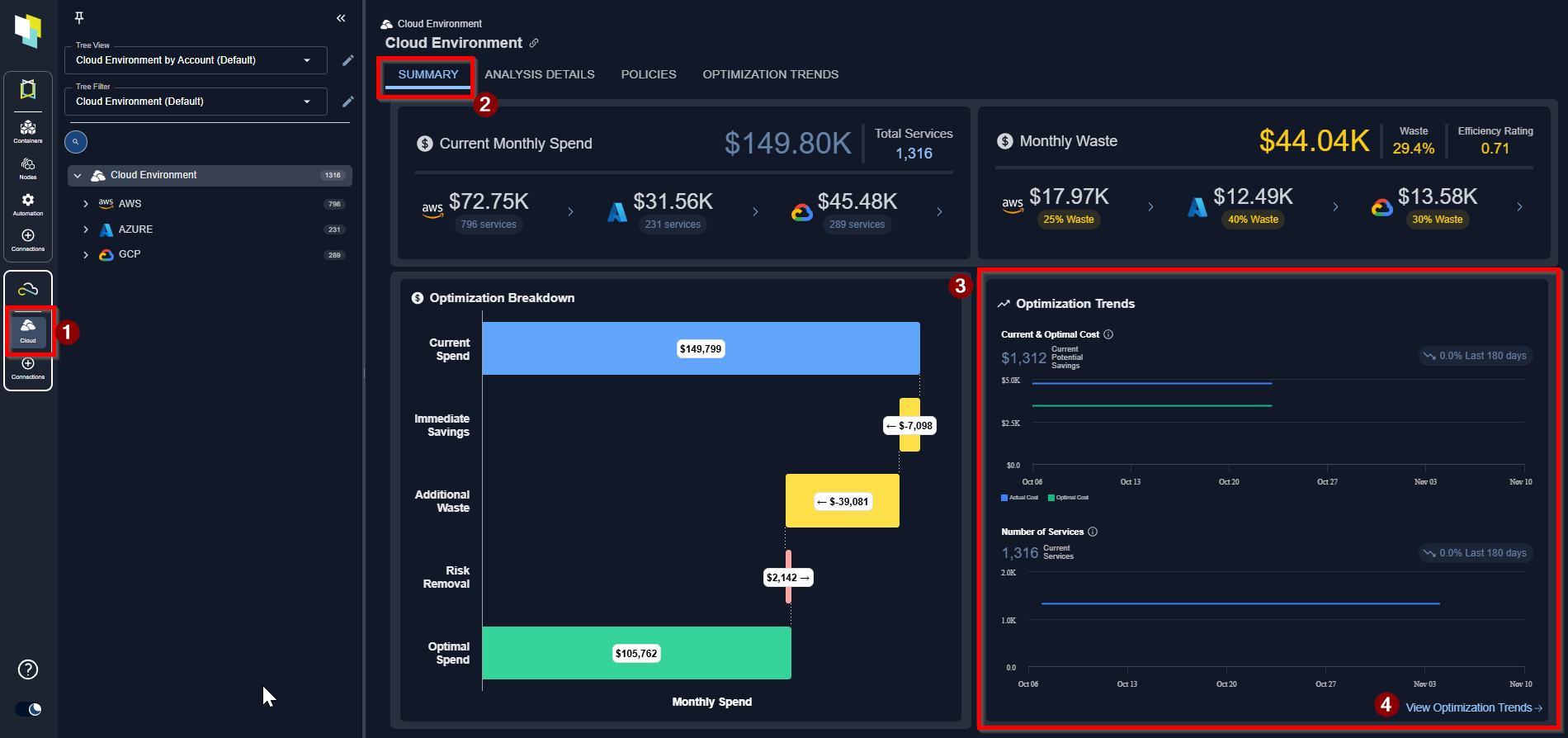
    * **Optimization Trends**

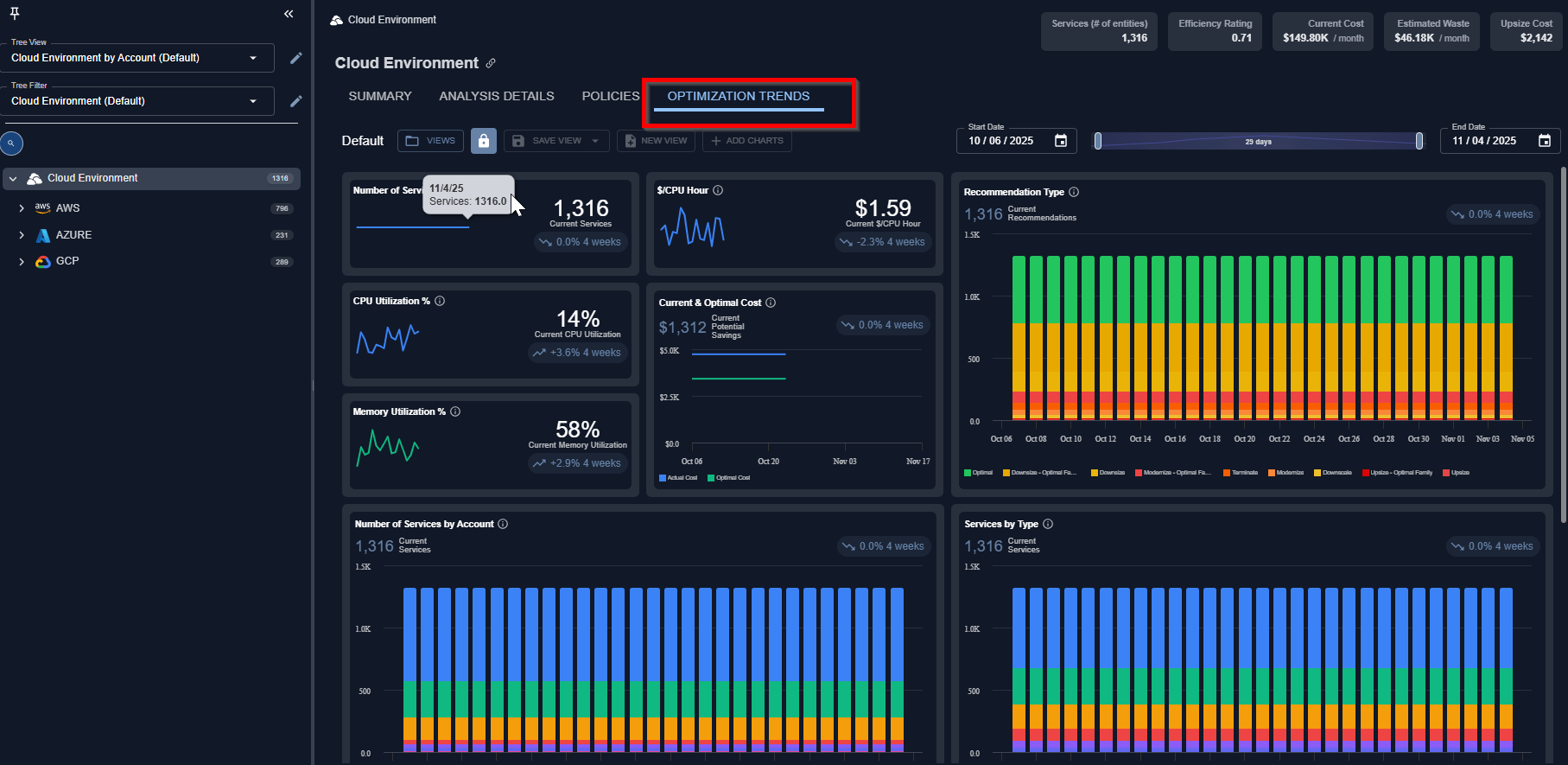
      * The Optimization Trends reports visualize historical trends across key operational metrics, including instance counts, costs, savings, and CPU/Memory utilization. This helps users better understand performance patterns and optimization impact over time.
      * Dashboards can be personalized - users can select which reports to display and organize them in their preferred layout. Each report can be resized to small, medium, or large for optimal viewing.
      * Users can save dashboards as public (where others in your organization can view but not edit) and private (where only they can view/edit them).

          <Frame caption="Figure: Optimization Trends on the Summary Tab">
            <img src="https://mintcdn.com/densify-sync-changelog-51/JrVB8Rbd7b6u7XzQ/images/docs/ReleaseNotes/v3.7/optimization_trend_summary.png?fit=max&auto=format&n=JrVB8Rbd7b6u7XzQ&q=85&s=5020e5f4556230a7052d8661bc3f9e58" width="100%" data-path="images/docs/ReleaseNotes/v3.7/optimization_trend_summary.png" />
          </Frame>

          <Frame caption="Figure: Optimization Trends Dashboard">
            <img src="https://mintcdn.com/densify-sync-changelog-51/JrVB8Rbd7b6u7XzQ/images/docs/ReleaseNotes/v3.7/optimization_trend_details.png?fit=max&auto=format&n=JrVB8Rbd7b6u7XzQ&q=85&s=434a72b865e30caea625db70fdbd430f" width="100%" data-path="images/docs/ReleaseNotes/v3.7/optimization_trend_details.png" />
          </Frame>
  </Accordion>
</Accordion>

<Accordion title="3.6.0 October 1, 2025">
  <Accordion title="Updates to Container Optimization">
    The following changes have been made to Kubex in this release:

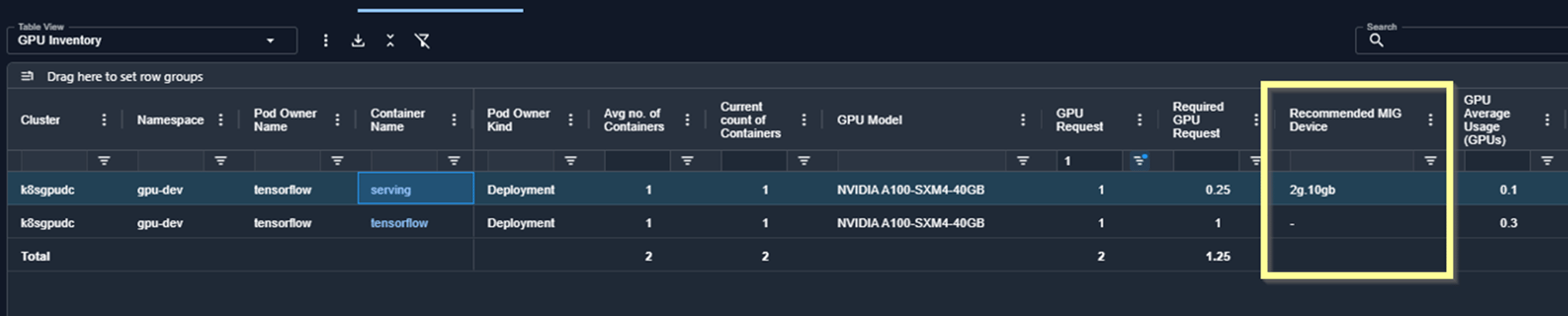
    * **GPU MIG Recommendation**--Supports NVIDIA MIG (Multi-Instance GPU) technology, recommending whether workloads should use a full GPU or a fraction (MIG slice).
      * The Analysis Details table will highlight the suggested MIG profile (and the GPU fraction it represents).
          <Frame caption="Figure: Analysis Details Table - Recommended MIG Device">
            <img src="https://mintcdn.com/densify-sync-changelog-51/JrVB8Rbd7b6u7XzQ/images/docs/ReleaseNotes/v3.6/kubex_analysis_details_mig_device.png?fit=max&auto=format&n=JrVB8Rbd7b6u7XzQ&q=85&s=227f9b0fb1bb87e712a8b73f06d7d436" width="100%" data-path="images/docs/ReleaseNotes/v3.6/kubex_analysis_details_mig_device.png" />
          </Frame>
      * MIG recommendation info is also available in the GPU tab for an individual container manifest
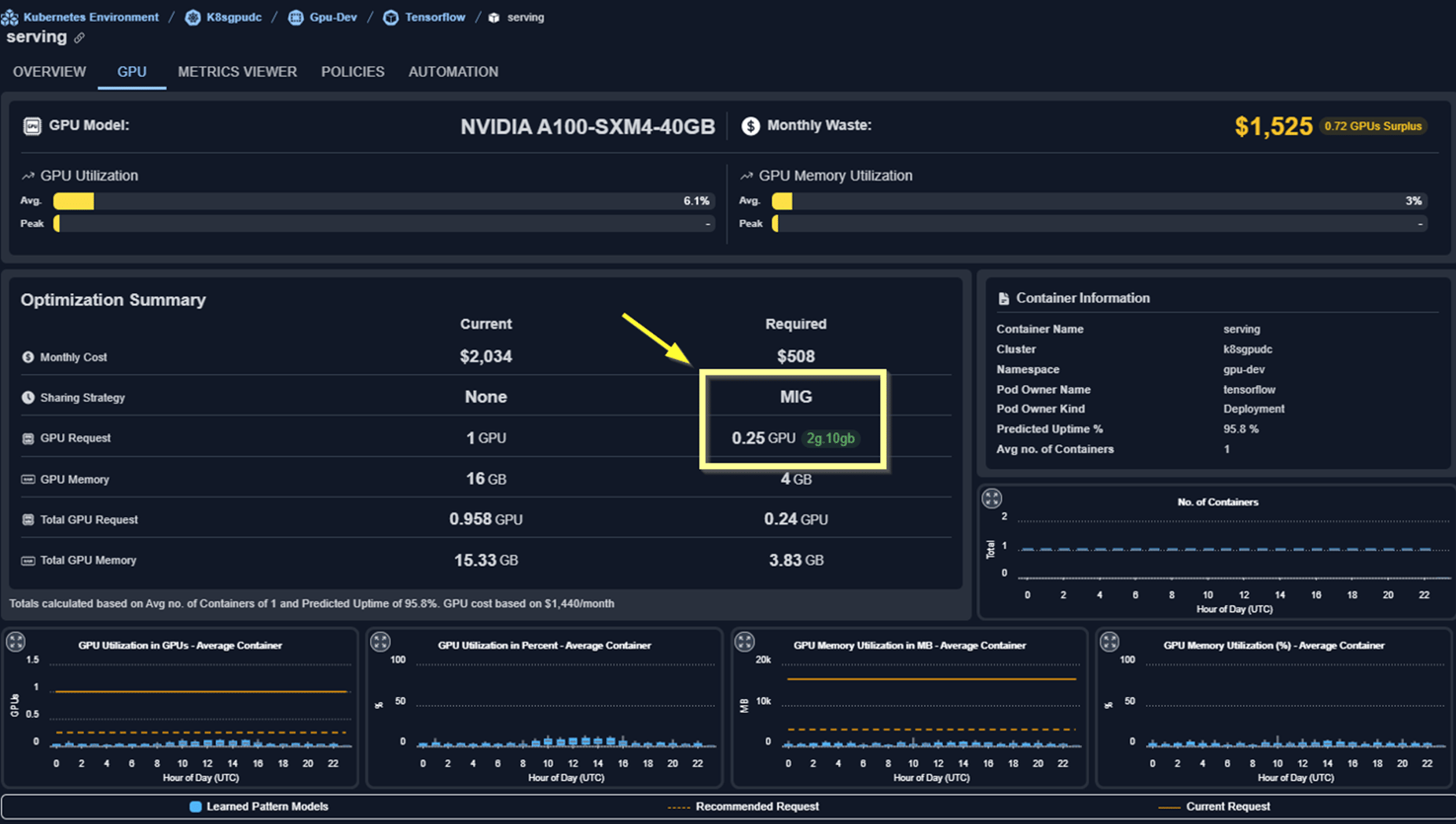
          <Frame caption="Figure: GPU Tab - Optimization Summary with MIG Recommendation">
            <img src="https://mintcdn.com/densify-sync-changelog-51/JrVB8Rbd7b6u7XzQ/images/docs/ReleaseNotes/v3.6/kubex_gpu_optimization_summary.png?fit=max&auto=format&n=JrVB8Rbd7b6u7XzQ&q=85&s=5930b3cdaac82fd3e9175c8c998de6df" width="100%" data-path="images/docs/ReleaseNotes/v3.6/kubex_gpu_optimization_summary.png" />
          </Frame>
    * **Updated Container Summary Tab**
      * "Waste" links now take you directly to the Analysis Details tab with the appropriate filter preselected
      * "Info" tooltip has been added to the Spend Breakdown modal. This highlights the total unspecified CPU/Memory request. With this info, the numbers here and in the Analysis Details table will match up.
    * **Memory Limit Events (Last Day) added to Analysis Details table**--This is a hidden column by default.
    * **Node/Node Group Analysis**--Improved quality of recommendations by switching to "Working Set Memory" when available. Working set memory is a better metric to analyze the memory requirements for Nodes.
    * **Other Improvements & Updates**
      * GPU and GPU Memory metrics viewer chart: added "Current Request" line
      * Added a new view on the Analysis Details table: "GPU Request Surplus". This highlights the container manifests that have surplus GPU and can be optimized to reduce waste.
      * Container API now include a "analyzedOn" date which allows the automation to only consider fresh recommendations.
      * Removed the word "AI" from "AI Analysis Details"
  </Accordion>

  <Accordion title="Updates to Cloud Optimization">
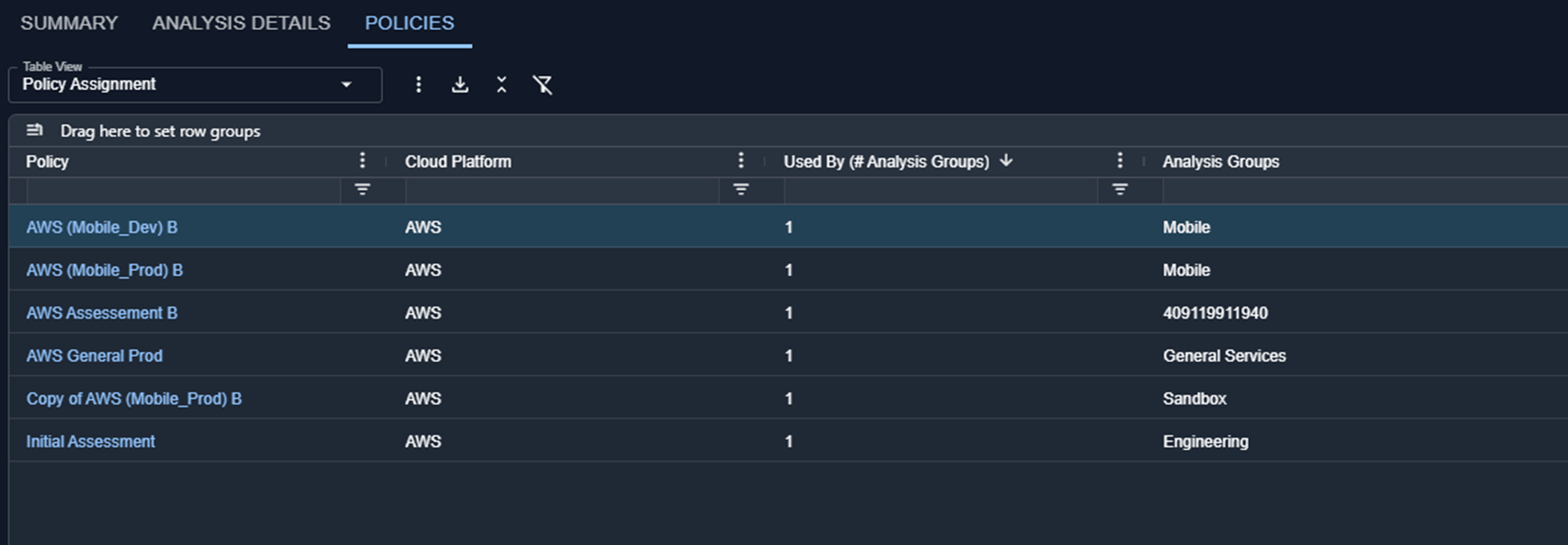
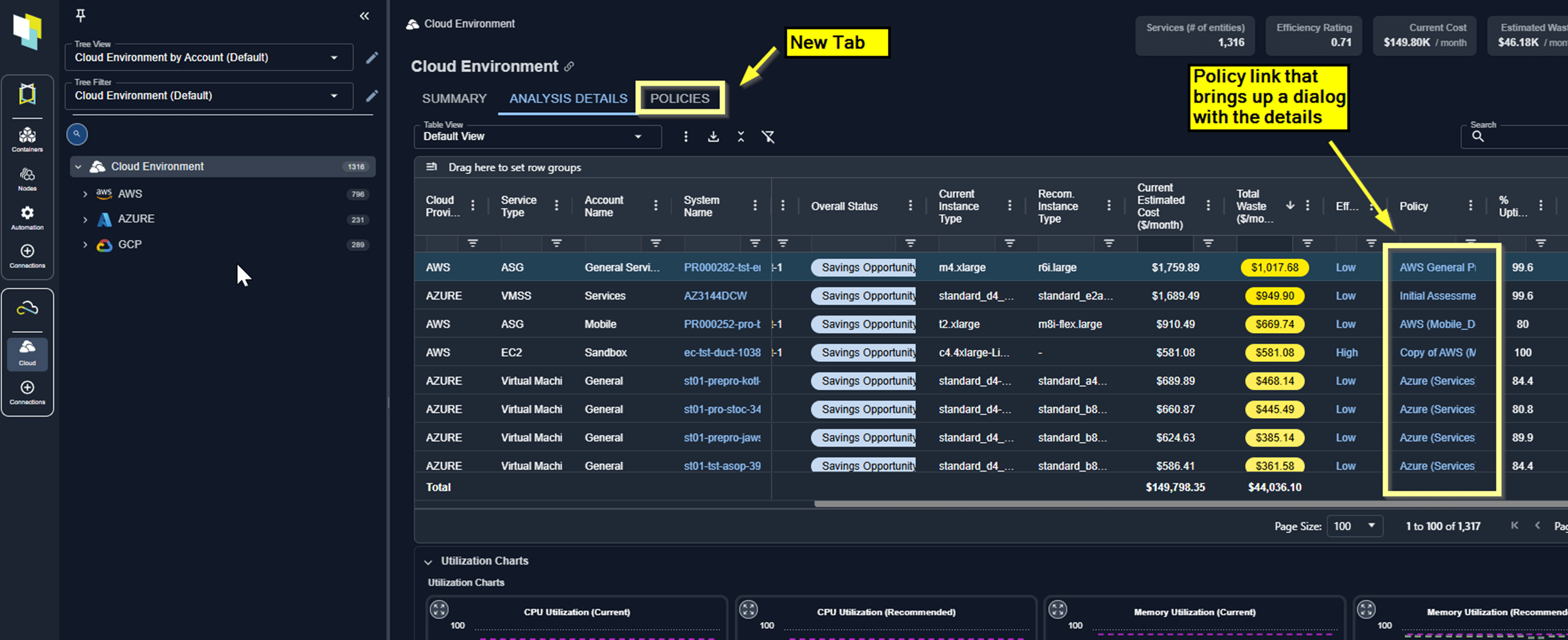
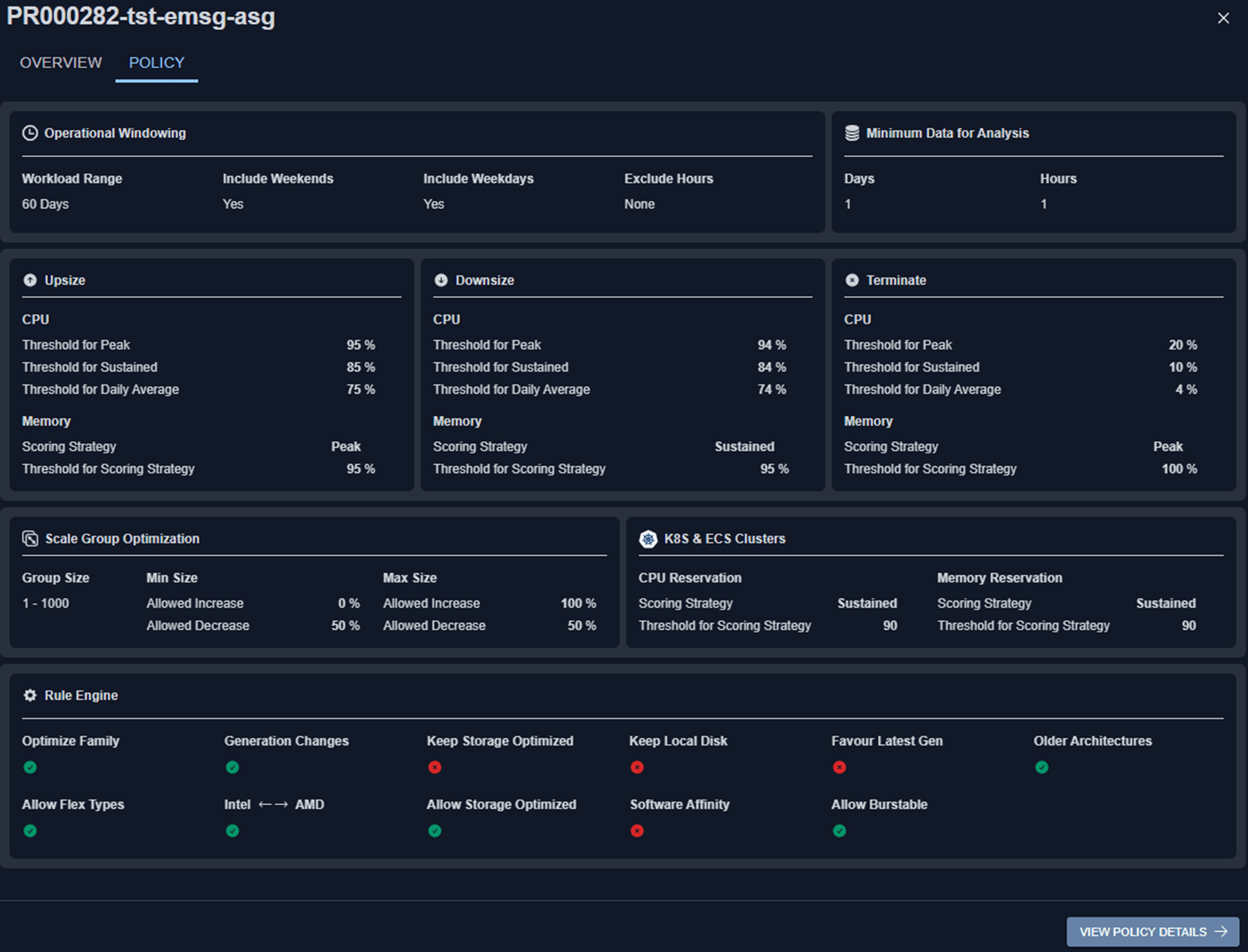
    * **Policies**--View policies for Cloud environments in a new modal, accessible from the Policies tab and Analysis Details table.
          <Frame caption="Figure: Policy Modal">
            <img src="https://mintcdn.com/densify-sync-changelog-51/JrVB8Rbd7b6u7XzQ/images/docs/ReleaseNotes/v3.6/cloudex_policy_modal.png?fit=max&auto=format&n=JrVB8Rbd7b6u7XzQ&q=85&s=7754922dac568570d4757d2fef424e92" width="100%" data-path="images/docs/ReleaseNotes/v3.6/cloudex_policy_modal.png" />
          </Frame>
      * Policies Tab
          <Frame caption="Figure: Policies Tab">
            <img src="https://mintcdn.com/densify-sync-changelog-51/JrVB8Rbd7b6u7XzQ/images/docs/ReleaseNotes/v3.6/cloudex_policies_tab.png?fit=max&auto=format&n=JrVB8Rbd7b6u7XzQ&q=85&s=9ec5a0cb9239824ee02d02c1b0a6b8ff" width="100%" data-path="images/docs/ReleaseNotes/v3.6/cloudex_policies_tab.png" />
          </Frame>
      * Analysis Details Table
          <Frame caption="Figure: Analysis Details Table - Policy">
            <img src="https://mintcdn.com/densify-sync-changelog-51/JrVB8Rbd7b6u7XzQ/images/docs/ReleaseNotes/v3.6/cloudex_analysis_details_policy.png?fit=max&auto=format&n=JrVB8Rbd7b6u7XzQ&q=85&s=5c327247ba2745cf35be87e9a16a0f03" width="100%" data-path="images/docs/ReleaseNotes/v3.6/cloudex_analysis_details_policy.png" />
          </Frame>
    * **Updated Azure Catalog Map**--Azure Catalog Map has been updated to show all supported VM types and sizes. These are displayed on the map when "Commonly Used" is unselected.
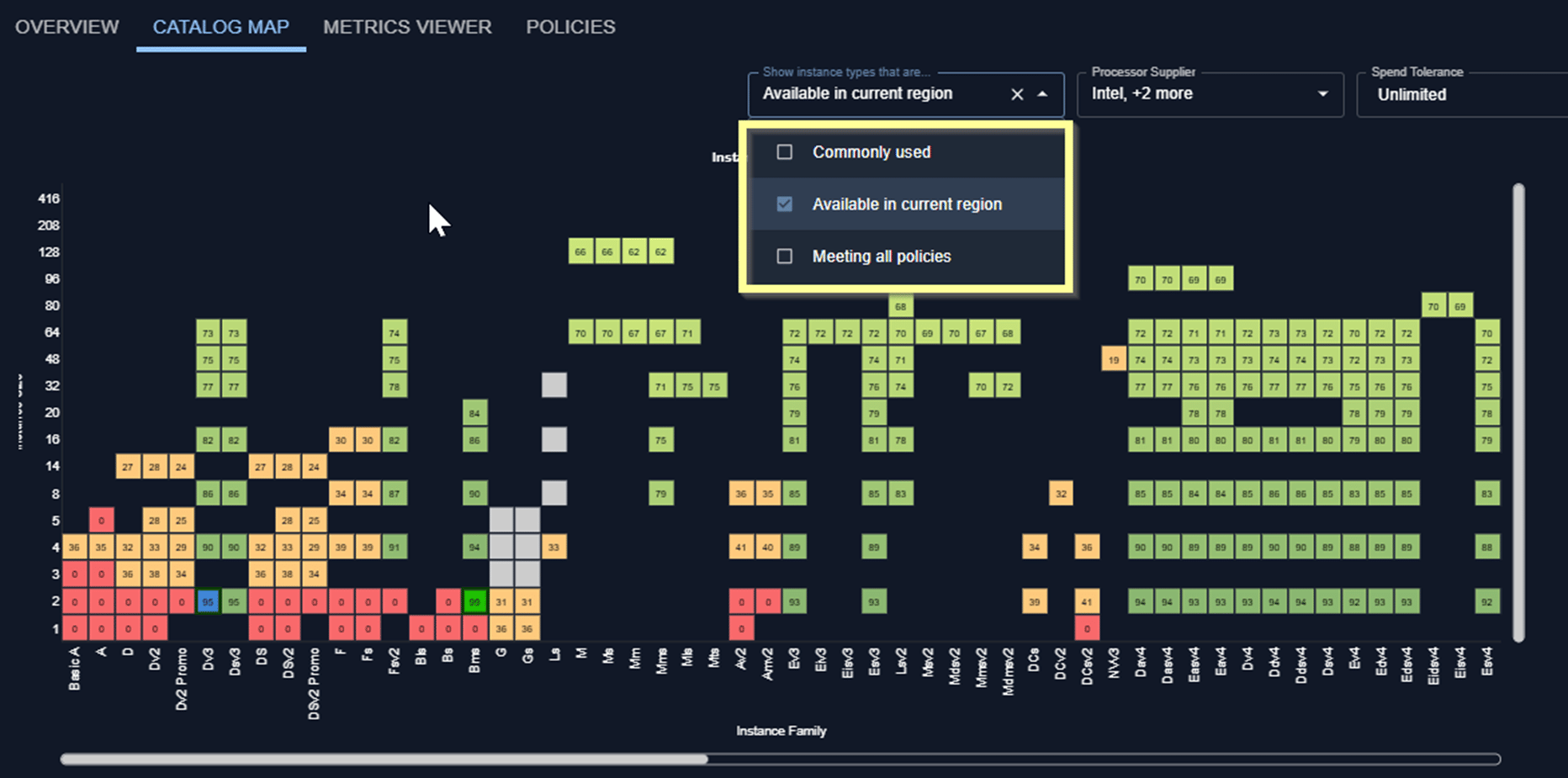
          <Frame caption="Figure: Updated Azure Catalog Map">
            <img src="https://mintcdn.com/densify-sync-changelog-51/JrVB8Rbd7b6u7XzQ/images/docs/ReleaseNotes/v3.6/cloudex_azure_catalog_map.png?fit=max&auto=format&n=JrVB8Rbd7b6u7XzQ&q=85&s=a75fa9e2d92af7392ac08b79b192aaa6" width="100%" data-path="images/docs/ReleaseNotes/v3.6/cloudex_azure_catalog_map.png" />
          </Frame>
    * **Added columns to Analysis Details table**
      * Comment
      * Recommendation Reason
      * RDS Cluster ID
      * Resource Tags
  </Accordion>

  <Accordion title="Administration">
    * **SSO with Okta**--Removed requirement for Okta's CAS (Central Authentication Service).
    * **Password Reset**--Password reset emails now link to Kubex instead of Kubex Console.
  </Accordion>
</Accordion>

<Accordion title="3.5.0 August 13, 2025">
  <Accordion title="Updates to Container Optimization">
    The following changes have been made to Kubex in this release:

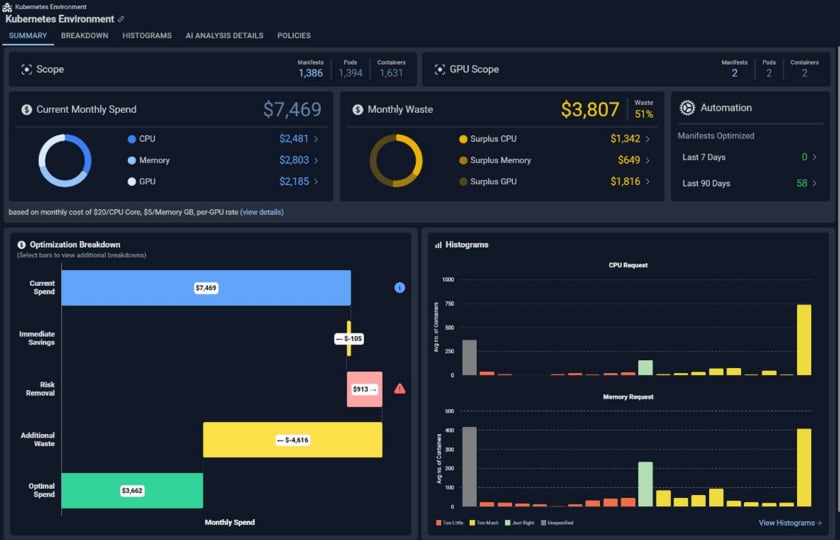
    * **Updated Container Summary Tab**--The container summary page has been updated with a new look and feel to better highlight current spend, waste, and risk.

    <Frame caption="Figure: Container Summary Tab">
      <img src="https://mintcdn.com/densify-sync-changelog-51/JrVB8Rbd7b6u7XzQ/images/docs/ReleaseNotes/v3.5/container_summary_tab.png?fit=max&auto=format&n=JrVB8Rbd7b6u7XzQ&q=85&s=54b10140056f1c5bd645214af970c001" width="100%" data-path="images/docs/ReleaseNotes/v3.5/container_summary_tab.png" />
    </Frame>

    * **Container Out of Memory Kills**--Container out of memory kill data is now visible in OOM Kills (Last Day) column on the Analysis Details page:
      * Badges will display on summary and histogram page to indicate if there are
        OOM Kills in the environment
      * ML Model and historical data available in the Utilization Charts carousel and Metrics Viewer
    * **CPU Throttling (%)**--CPU Throttling data is now visible in CPU Throttling (%) column on the Analysis Details page:
      * ML Model and historical data available in Utilization Charts carousel and
        Metrics Viewer
    * **Automation Tab**--Automation tab has been added to highlight request and limit changes made by the Kubex Automation Engine. An overview of optimized manifests
      is also available on the summary page
    * **Business & Operational Attributes**--Various business and operations related
      attributes (e.g., Application, Business Unit, Cost Center, Operational Environment) have been added to the tree view/filter options and Analysis Details
      columns
    * **GPU Optimization for Container Resource Requests**--- Containers with GPUs
      allocated now receive recommendations for downsize opportunities. The GPU Overview page has been updated to highlight this information:
      * Added system views to Analysis Details (Immediate GPU Savings & Addtional GPU Waste)
  </Accordion>

  <Accordion title="Updates to Cloud Optimization">
    The following changes have been made to Public Cloud optimization in this release:

    * **Effort Popup**--The Effort column on the Analysis Details page is now clickable, showing a popup with additional details on the effort required to change to the recommended instance type.
      * Overall effort is the highest effort of the individual rule items. Possible values are None, Low, Medium, and High
    * **Business & Operational Attributes**--Various business and operations related attributes (e.g., Application, Business Unit, Cost Center, Operational Environment) have been added to the tree view/filter options and the Analysis Details page.
      columns
  </Accordion>
</Accordion>

<Accordion title="3.4.0 July 9, 2025">
  <Accordion title="Updates to Container Optimization">
    The following changes have been made to Kubex in this release:

    * **Updated Container Summary Tab**--The container summary page has been updated to better highlight both your current spend and the details of possible savings.
    * **Updated Node Metrics**--The Node Metrics Viewer has been updated to show the following GPU metrics:
      * GPU Utilization %
      * GPU Memory Utilization (%)
      * GPU Power Usage (Watts)
    * **Updated Utilization Chart**--The node chart showing the number of pods running on a node has been updated to show the limit for the selected node.
    * **Customizable Data Aggregation**--You now have the ability to edit how grouped data in a table is aggregated (i.e. sum, average, max, etc.) and save your customization in a table view. This feature is available for containers, node groups, nodes and cloud instances.

    Refer to the [Kubex documentation](/docs-kubex/Content/Kubex/Getting_Started_with_Kubex) for details.
  </Accordion>

  <Accordion title="Updates to Cloud Optimization">
    The following changes have been made to the Public Cloud optimization in this release:

    * **Cloud Connections**--In this release you can now can create and edit the connections to AWS and Azure. You can also view data collection status for each of the connections. Kubex uses these connections to collect data from each account, daily.
    * **Accessing the Catalog Map**--You can now access the catalog map directly from the Analysis Details tab. The catalog map with a modal view has been added to the utilization charts. You now do not need to leave the Analysis Details tab to use the catalog map.
    * **Summary Tab**--The Cloud Summary tab has been updated to improve useability.

    Refer to the [Kubex documentation](/docs-kubex/Content/Kubex/Getting_Started_with_Kubex) for details.
  </Accordion>

  <Accordion title="Enhanced Cost Modeling">
    The following changes have been made to improve how Kubex determines the cost of public cloud instances, using customer-specific discounts:

    * **Azure Hybrid Benefit Status**--As part of enhancing the cost data model, Kubex needs to distinguish between systems that are BYOL (also called Azure Hybrid Benefit or AHB) to accurately represent the cost of the system. The license model is available in the existing data collection configuration so no changes are required to the minimum permissions for BYOL VMs.
    * **Azure Instance OS Name**--Kubex now determines the type of Linux OS. In this release RHEL and SUSE are supported. The OS name is used to accurately determine instance costs.
    * **Updated Cost Model**--The cloud cost data model has been updated to apply discounts based on the following details:
      * OS Type--The type of Linux OS installed on a cloud instance. This is not an attribute and is stored in a table but cannot be edited or cleared like an attribute.
      * License Model (Attr\_key is aws:licensemodel)--The licensing model that has been configured for a cloud instance )
      * Life Cycle (Attr\_key is aws:lifecycle)--This attribute is not currently used but is collected for future development. It is used to store whether or not the instance is a spot instance. Possible values are "spot" or "normal"

    Refer to the [Kubex documentation](/docs-kubex/Content/Kubex/Getting_Started_with_Kubex) for details.
  </Accordion>
</Accordion>

<Accordion title="3.3.0 June 25, 2025">
  <Accordion title="Updates to Container Optimization">
    The following changes have been made to Kubex in this release:

    * **Node Modal**--A new modal opens when you click a node name on the Node Details page.
    * **Performance Improvements**-- The Kubex UI no longer retrieves data from the Kubex Reporting Database (RDB). All UI component queries are directed exclusively to Kubex-specific tables in MS SQL.

    Refer to the [Kubex documentation](/docs-kubex/Content/Kubex/Getting_Started_with_Kubex) for details.
  </Accordion>
</Accordion>

<Accordion title="3.2.0 June 11, 2025">
  <Accordion title="Updates to Container Optimization">
    The following changes have been made to Kubex in this release:

    * **GPU Metrics for Containers**--In this release Kubex introduces reporting of GPU configuration and utilization data for containers, node groups and nodes. This data enables you to identify GPU-enabled containers and nodes in your environment and see how effectively you are utilizing your GPU resources.

      You must have [data forwarder v4.2.1](#Forwarder) deployed to collect the GPU data from your environments.

      There are updates on many pages to highlight GPU resource configuration and utilization:

      * **Updated Analysis Details**--A number of data points allow you to identify containers with GPU requests and to determine where the GPU and GPU memory request values are higher than peak utilization over a given period.
        The analysis populates these attribute values based on the date range and data selection options that are defined in your container optimization policy. The Analysis Details page has been updated to display the following GPU data.

            <table>
              <col />

              <col />

              <tbody>
                <tr>
                  <td>
                    <ul class="ul_3">
                      <li>
                        GPU Model
                      </li>

                      <li>
                        GPU Request
                      </li>

                      <li>
                        Total GPU Request
                      </li>

                      <li>
                        GPU Average
                      </li>

                      <li>
                        %GPU Average
                      </li>

                      <li>
                        GPU Sustained
                      </li>

                      <li>
                        GPU Min
                      </li>

                      <li>
                        GPU Memory Request
                      </li>

                      <li>
                        Total GPU Memory Request
                      </li>
                    </ul>
                  </td>

                  <td>
                    <ul class="ul_3">
                      <li>
                        GPU Memory Average
                      </li>

                      <li>
                        % GPU Memory Average
                      </li>

                      <li>
                        GPU Memory Sustained
                      </li>

                      <li>
                        GPU Memory Min
                      </li>

                      <li>
                        GPU Power Usage Peak
                      </li>

                      <li>
                        GPU Power Usage Average
                      </li>
                    </ul>
                  </td>
                </tr>
              </tbody>
            </table>
      * **New Views**--Four new views have been added to the Analysis Details page. These views allow you to focus on your GPU data:

            <table>
              <col />

              <col />

              <tbody>
                <tr>
                  <td>
                    <ul class="ul_3">
                      <li>
                        GPU Inventory
                      </li>

                      <li>
                        GPU Cost
                      </li>
                    </ul>
                  </td>

                  <td>
                    <ul class="ul_3">
                      <li>
                        GPU Low Utilization
                      </li>

                      <li>
                        GPU Memory Low Utilization
                      </li>
                    </ul>
                  </td>
                </tr>
              </tbody>
            </table>

        The default view has been updated to include GPU data.
      * **Updated Summary**--New GPU-specific cards have been added to the containers Summary page. A note includes a link that opens a modal containing GPU pricing details.

        The top two cards on the Summary page have also been updated to better highlight both your current spend and the details of possible savings.
      * **New GPU Tab**--A new GPU tab has been added when reviewing a single container. This new page provides details of the GPU utilization on the selected container.
      * **Updated Metrics Viewer**--The following GPU metrics are available in the metrics viewer:
        * GPU Utilization in GPUs - Average Container
        * GPU Memory Utilization (MB) - Average Container
        * GPU Memory Utilization (%) - Average Container
        * GPU Power Usage (Watts) - Average Container
    * **GPU Metrics for Node Groups**--GPU metrics have also been added for Node Groups and individual nodes.

          <table>
            <tbody>
              <tr>
                <td>
                  <ul>
                    <li>
                      Allocatable GPU Memory (GB)
                    </li>

                    <li>
                      Allocatable GPUs
                    </li>

                    <li>
                      Allocatable Memory (GB)
                    </li>

                    <li>
                      Average CPU Utilization (%)
                    </li>

                    <li>
                      Average GPU Memory Utilization (%)
                    </li>

                    <li>
                      Average GPU Utilization (%)
                    </li>

                    <li>
                      Average Memory Utilization (%)
                    </li>

                    <li>
                      GPU - Node Balance Ratio
                    </li>

                    <li>
                      GPU Capacity
                    </li>

                    <li>
                      GPU Memory - Node Balance Ratio
                    </li>

                    <li>
                      GPU Memory Capacity (GB)
                    </li>
                  </ul>
                </td>

                <td>
                  <ul>
                    <li>
                      GPU Request (% of Allocatable)
                    </li>

                    <li>
                      No. of Nodes with Underused GPU
                    </li>

                    <li>
                      No. of Nodes with Underused GPU Memory
                    </li>

                    <li>
                      Nodes with Underused GPU Memory(%)
                    </li>

                    <li>
                      Nodes with Underused GPU(%)
                    </li>

                    <li>
                      Peak GPU Memory Utilization (%)
                    </li>

                    <li>
                      Peak GPU Utilization (%)
                    </li>

                    <li>
                      Primary Node GPU Model
                    </li>

                    <li>
                      Primary Node Type GPU (GPUs)
                    </li>

                    <li>
                      Primary Node Type GPU Memory (GB)
                    </li>

                    <li>
                      Unallocated GPUs
                    </li>
                  </ul>
                </td>
              </tr>
            </tbody>
          </table>
    * **Updated Node Overview Tab**--This tab has been updated add GPU details and to improve usability.
    * **New Data in Analysis Details**--Six new data points allow you to find containers where the CPU and memory request values are higher than peak utilization over a given period.

      The analysis populates these values based on the date range and data selection options that are defined in your container optimization policy.

      * CPU Peak--Highest peak value in mCores, on the busiest container.
      * CPU Sustained--Highest sustained value in mCores, on the average container.
      * CPU Min--Lowest value in mCores, on the average container.
      * Memory Peak--Highest peak value in MB, on the busiest container.
      * Memory Sustained--Highest sustained value in MB, on the average container.
      * Memory Min--Lowest value in mCores, on the average container.
    * **Timezone**--The utilization charts for containers, node groups and nodes have been updated to standardize the timeline on UTC. The X-axis label has been updated to indicate the timezone designation for all charts to 'UTC '.
    * **Updated Node Overview**--The node overview page has been updated to improve useability and add details of GPU utilization.

    Refer to the [Kubex documentation](/docs-kubex/Content/Kubex/Getting_Started_with_Kubex) for details.
  </Accordion>

  <Accordion title="Updates to Cloud Optimization">
    The following changes have been made to Public Cloud optimization in this release:

    * **Timezone**--The X-axis label has been updated to indicate the timezone designation for all historical utilization charts to 'UTC ' This change to does not currently apply to the ML charts. The ML charts on the Analysis Details page use Kubex server's time. So this will be either "Eastern Time" or "Central Europe Time".

    Refer to the [Kubex documentation](/docs-kubex/Content/Kubex/Getting_Started_with_Kubex) for details.
  </Accordion>
</Accordion>

<Accordion title="3.1.0 May 14, 2025">
  The following changes have been made in this release:

  * Users no longer need to clear their browser cache after an upgrade.

    When using the Kubex Console users must clear their browser cache after an upgrade,
  * **Analysis Details Export** --When the content of the Analysis Details is exported, the Container Name is provided as a hyperlink that takes you to the Overview page for the selected container.

    When you open the exported .XLS file, the content initially appears as plain text, and when you click on the cell it becomes a hyperlink.
  * **Node Group Overview**--The cards on the Node Group Overview page have been updated to better report on the status of a single node group. Additionally, utilization charts have been added to this page so you can review detailed metrics for a selected node group.
  * **New Filter**--A new public filter, "With automation enabled", has been added to the container tree viewer. When selected this filter displays all containers with automation enabled. i.e. Automation Enabled = true.
  * **Improved Performance>**--By focusing on nodes that were running in the last day rather than the past 7 days you will notice improved performance when working with nodes and node groups.
  * **Access to the Online Help**--A new help icon provides direct access to the online help.
  * **Renamed Value**--The value, "No. of Containers" has been renamed to, "Avg No. of Containers". The new name more appropriately describes the value. The following pages have been updated: Summary, Overview, Histogram and Analysis Details.

  Refer to the [Kubex documentation](/docs-kubex/Content/Kubex/Getting_Started_with_Kubex) for details.
</Accordion>

<Accordion title="3.0.0 April 23, 2025">
  <Accordion title="New Public Cloud Management Console">
    <div style={{ width:"100%",display:"flex",flexDirection:"row",alignItems:"center",justifyContent:"space-between",gap:"6px" }}>
      <div style={{ width:"30%" }}>
        <img src="https://mintcdn.com/densify-sync-changelog-51/NvS6mieuImh9t773/images/docs/WebHelp_Densify_Cloud/Content/Resources/Images/03000000.svg?fit=max&auto=format&n=NvS6mieuImh9t773&q=85&s=1e997ecffe6dce60801a2f5fbbdac453" alt="" width="76" height="49" data-path="images/docs/WebHelp_Densify_Cloud/Content/Resources/Images/03000000.svg" />
      </div>

      <div style={{ width:"70%" }}>
        <p>
          In this release Kubex introduces Public Cloud optimization features. In this new console, Kubex's patented analytics determine optimal resource settings for your public cloud environments and display the results in a new user interface.
        </p>

        <p>
          Use the new console to review resource utilization across your AWS, Azure and Google Cloud environments.
        </p>
      </div>
    </div>

    You can access the new console from your existing instance using:

    ```
    https://<customer name>.kubex.ai
    ```

    See the new [Kubex](https://www.kubex.ai) website to start a free trial.

    Use your existing Kubex credentials to access the console. You can either close the browser window or navigate back to the Kubex Console to log out.

    The new console uses the latest MSSQL and Postgres databases.
  </Accordion>

  <Accordion title="Kubex Updates">
    The following changes have been made to Kubex in this release:

    * **Automation Tab**--A new automation tab has been added to report on the status of the Kubex Container Automation solution.
    * **Updated Connections Table** --The following changes have been made to this table:
      * Three new columns have been added: Cluster Version, Kubex Collection Stack Version and Prometheus Version
      * A link that provides secure Kubex credentials has been added. The credentials are provided in a code snippet than can be copied directly into your `values.edit.yaml` file.

        This new method makes it easier for you to set up container data collection, reducing the previous manual dependency of requesting these credentials from Kubex.
    * **Updated Optimization Breakdown**--Hovering over any bar in this chart, displays a description of the recommended optimization. Badges have also been added to indicate significant information, such a s memory events or unspecified resource settings.
    * **Summary Page**--The Summary page has been updated for improved readability.
    * **Cost Modeling**--Kubex now has improved algorithms that use existing utilization data to estimate the cost for containers with unspecified CPU/memory request values. The Summary, Analysis Details, and Overview pages have all been updated to show the cost estimates for these containers. The following updates have been made to show these values:
      * Two columns have been added to the Analysis Details tab:
        * "Total Surplus CPU Request from Unspecified (mCores)";
        * "Total Surplus Memory Request from Unspecified (MB)"
      * Two system views have been added to the Analysis Details tab:
        * "CPU Request Shortfall (from Unspecified)"
        * "Memory Request Shortfall (from Unspecified)"
      * The Overview tab and single instance modal page have been updated to add details of unspecified CPU and memory request settings. These additional cards are only displayed if the selected container does not have specified CPU and/or memory request settings.

    Refer to the [Kubex documentation](/docs-kubex/Content/Kubex/Getting_Started_with_Kubex) for details.
  </Accordion>

  <Accordion title="Kubex Automation">
    This release provides enhancements to the Kubernetes automation framework that sends configuration and modification event status information to your Kubex instance

    A new Automation status page has been added to Kubex that reports on the status of containers that have been enabled for automation, You can enable/disable containers for automation using a right-click context menu from the Kubex container tree viewer. Refer to the [Kubex documentation](/docs-kubex/Content/Kubex/Getting_Started_with_Kubex) for details.

    Refer to [Kubex Automation Engine](https://github.com/densify-dev/helm-charts/tree/master/charts/kubex-automation-engine) for details on deploying and using the Kubex Container Automation solution.
  </Accordion>

  <Accordion title="New Kubernetes API Endpoints">
    The following endpoints have been added to the Kubex API:

    * `GET /kubernetes/clusters`
    * `GET /kubernetes/clusters/<clusterName>`
    * `GET /kubernetes/clusters/<clusterName>/containers`
    * `GET /kubernetes/clusters/<clusterName>/containers?details=true`
    * `GET /kubernetes/clusters/<clusterName>/automation`

    Two new attributes have been added to support the automation features.

    * Kubex Automation--Indicates whether the container is eligible for automation within Kubex.The attribute is set one-time, is static, and is not inherited from cluster, node group, or any higher level.
    * Kubex Policy--Indicates what policy to use when automation is enabled.

    See [Kubex API New Features](/docs-api/WebHelp_Densify_API_Cloud/Content/API_Guide/API_New_Features)
  </Accordion>

  <Accordion title="Updated API Token Expiry Duration">
    The token expiry has been increased from 5 to 60 minutes. Re-authorize will no longer be required for longer-running pipeline operations that previously exceed the 5-minute limit. The JSON Web Token (JWT) secures the Kubex API so users can only make authorized API requests.

    See [Authorize](/docs-api/WebHelp_Densify_API_Cloud/Content/API_Guide/Authorize)
  </Accordion>

  <Accordion title="Changes to Scale Groups with Max Size =1">
    In this release, singleton scale groups, both ASGs and VM Scale Sets, will now be analyzed as scale groups rather than as EC2 or VM instances. You will observe the following changes:

    * Kubex Console:
      * Singleton ASGs/VM Scale Sets will now only appear in the corresponding ASG or VM Scale Set tabs.
      * If you have large number of these singleton scale groups, you may notice a decrease in the number of EC2 and Azure VMs reported, while the ASG and VM Scale Set counts will increase accordingly.
      * The Catalog Map will no longer report on ASGs and VM Scale Sets with Max Size =1.
      * No change to the Impact Analysis and Recommendation Report for ASGs, as this report recognized singleton ASG instances and reported on them accordingly.
    * Scaling Recommendations:
      * Singleton scale groups will now have scaling recommendations, as required. Previously, there were no scaling recommendations, only instance type change recommendations.
      * If you need to control the group size and prevent scaling, use the "Group Max Size Override" and "Group Min Size Override" attributes. See [Overriding Cloud Recommendations](../Densify_Com/Overriding_Cloud_Recommendations#Scale_Group_Overrides). Contact <a href="mailto:support@kubex.ai">
        [support@kubex.ai](mailto:support@kubex.ai)</a>

        for detail of configuring these attributes.
    * API Results:
      * There are no changes to how scale groups are managed through the Kubex API. Scale groups have service type "ASG" or "VMSS".
      * Scaling recommendation are already included in the results. See [Analysis: AWS Recommendations](/docs-api/WebHelp_Densify_API_Cloud/Content/API_Guide/Analysis_AWS_Results). or [Analysis: Azure Recommendations](/docs-api/WebHelp_Densify_API_Cloud/Content/API_Guide/Analysis_Azure_Results)..
    * Licensing:
      * Currently, singleton scale groups are licensed as individual EC2/VMs.
      * With this update, ASG licensing can be based on 1 ASG = 4 licenses OR 1 license per instance, based on the average number of instances in the scale group.

        VM Scale Sets are licensed using 1 license per instance, based on the average number of instances in the group.

        See
        [License Compliance Report](../Densify_Com/License_Compliance_Report).
      * The current container licensing model is based on the last known number of containers, on which the scale groups are running. With this change, container licensing will be calculated based on the average number of containers used, over the data range, as defined in the policy.
  </Accordion>

  <Accordion title="Updated Public Cloud Catalog">
    The public cloud metadata catalogs have been updated to ensure Kubex recommendations are based on the latest vendor pricing:

    * AWS Metadata Updates:
      * The pricing has been updated and is correct as of April 7, 2025.
      * The following new instance type has been added:

            <table>
              <col />

              <col />

              <col />

              <tbody>
                <tr>
                  <td>
                    <ul class="ul_3">
                      <li>
                        i8g.48xlarge
                      </li>
                    </ul>
                  </td>

                  <td>
                    <p />
                  </td>

                  <td />
                </tr>
              </tbody>
            </table>
    * Azure Metadata Updates:
      * The pricing has been updated and is correct as of April 7, 2025.
      * The following new instance families have been added:

            <table>
              <col />

              <col />

              <col />

              <tbody>
                <tr>
                  <td>
                    <ul class="ul_3">
                      <li>
                        Dsv6
                      </li>

                      <li>
                        Ddsv6
                      </li>

                      <li>
                        Dasv6
                      </li>

                      <li>
                        Dadsv6
                      </li>

                      <li>
                        Dlsv6
                      </li>

                      <li>
                        Dldsv6
                      </li>

                      <li>
                        Dalsv6
                      </li>

                      <li>
                        Daldsv6
                      </li>
                    </ul>
                  </td>

                  <td>
                    <ul class="ul_3">
                      <li>
                        Esv6
                      </li>

                      <li>
                        Edsv6
                      </li>

                      <li>
                        Easv6
                      </li>

                      <li>
                        Eadsv6
                      </li>
                    </ul>
                  </td>

                  <td>
                    <ul class="ul_3">
                      <li>
                        Fasv6
                      </li>

                      <li>
                        Falsv6
                      </li>

                      <li>
                        Famsv6
                      </li>
                    </ul>
                  </td>
                </tr>
              </tbody>
            </table>
      * Retired the following instances:

            <table>
              <col />

              <col />

              <col />

              <tbody>
                <tr>
                  <td>
                    <ul class="ul_3">
                      <li>
                        NC
                      </li>

                      <li>
                        NC-Promo instances
                      </li>
                    </ul>
                  </td>

                  <td>
                    <ul class="ul_3">
                      <li>
                        NCv2 instances
                      </li>
                    </ul>
                  </td>

                  <td />
                </tr>
              </tbody>
            </table>
    * GCP Metadata Updates:
      * The pricing has been updated and is correct as of April 14, 2025.
      * The following new instance families have been added:

            <table>
              <col />

              <col />

              <col />

              <tbody>
                <tr>
                  <td>
                    <ul class="ul_3">
                      <li>
                        c4a-standard-lssd
                      </li>
                    </ul>
                  </td>

                  <td>
                    <ul class="ul_3">
                      <li>
                        c4a-highmem-lssd
                      </li>
                    </ul>
                  </td>

                  <td />
                </tr>
              </tbody>
            </table>
  </Accordion>
</Accordion>